
Your own data store
A data store is one JSON file listing maps, tracks, reference genomes and saved sessions, with columns to choose them by. The store drawer shows it with a facet per column, each value counted, a search box, a matrix of any two columns, and rows to open or add to the tab in front. Only the store file is read until a row is opened.
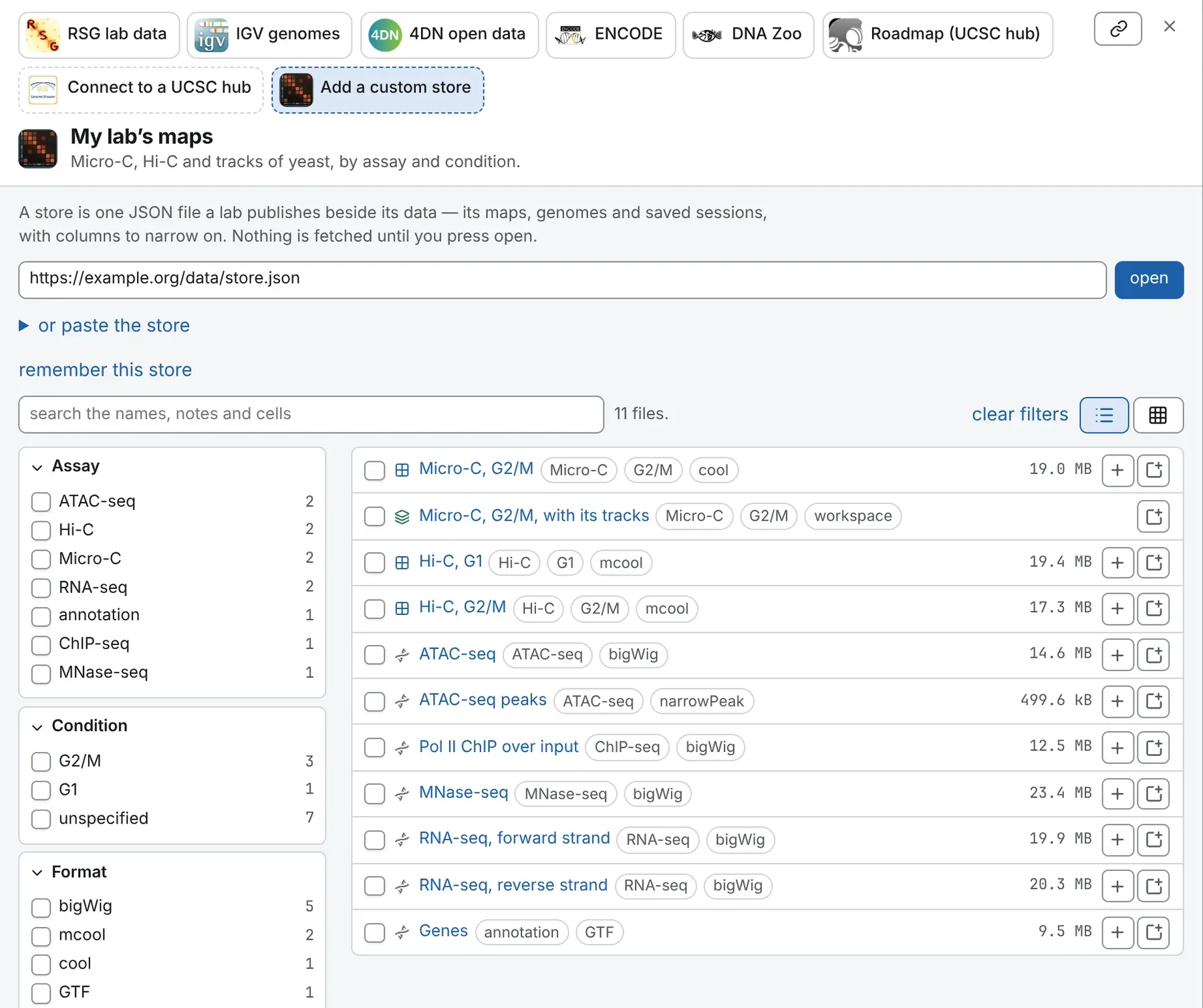
A first store
Section titled “A first store”{ "kind": "chromosomix.store", "version": 1, "name": "My lab’s maps", "description": "Micro-C and ATAC-seq of yeast, by condition.", "base": "https://example.org/data/", "columns": [ { "key": "assay", "label": "Assay" }, { "key": "condition", "label": "Condition" } ], "entries": [ { "label": "Micro-C, G2/M", "uri": "microC_G2M.mcool", "kind": "map", "size": 1250000000, "fields": { "assay": "Micro-C", "condition": "G2/M" }, "note": "GEO GSE000000", "tracks": [ { "label": "ATAC-seq", "url": "ATAC_G2M.bw" } ] }, { "label": "Micro-C with its tracks, as in the paper", "uri": "figure2.chromosomix.json", "kind": "workspace", "fields": { "assay": "Micro-C", "condition": "G2/M" } } ]}Two rows, read under base: a contact map with an ATAC-seq bigWig offered beside it, and a saved workspace, with the facets Assay and Condition.
The file, field by field
Section titled “The file, field by field”The store
Section titled “The store”| Field | What it is |
|---|---|
kind |
required: always "chromosomix.store"; a JSON file without it is refused as not a store. |
entries |
required: the rows, below. |
version |
1, the format this viewer reads; a later version is refused. |
name |
what the drawer, and a remembered tile, call the store. |
description |
one line under the name. |
base |
the address relative names resolve against; by default, the store file’s own. |
columns |
the facets, in order, each { "key": …, "label": … }: entries’ fields are looked up by key, and label, or else the key, names the facet. |
group |
the column the rows belong to (a dataset, a species): the list folds them under a heading per value. |
headline |
the columns whose values a group’s heading repeats. |
layout |
"list", the default, or "cards": a card per value of group (Cards). |
generatedAt, source |
when, and from what, a script wrote the store. |
An entry
Section titled “An entry”| Field | What it is |
|---|---|
label |
required: the row’s name, and the name the file takes once open. |
uri |
required: the file, a name relative to base or a full address (Addresses). |
kind |
map, genome or workspace (below); by default, read from the file name. |
size |
the file’s size in bytes, shown on the row before it is opened. |
note |
free text, shown on the row and matched by the search box: an accession, a paper, a replicate. |
fields |
one value per column key, as text: { "assay": "Micro-C" }, a number as "2". A missing value is an empty cell. |
tracks |
tracks published with this file, each { "label": …, "url": … }, resolved like uri. Once the row is open, the Tracks card offers them in one press: load the 2 tracks published with this map. |
Kinds of entry
Section titled “Kinds of entry”map— a contact map (.cool,.mcool,.hic,.scool,.pairs, a HiC-Pro matrix): it opens as a tab’s map, or joins the deck of the tab in front.genome— any other file (a track, a reference sequence, a 3D model): it opens the genome browser over its assembly, or joins a tab’s map as a track or a 3D model.workspace— a saved.chromosomix.json, opened as its tabs (Saved sessions in a store).
Without kind, a .json is a workspace, a name the viewer opens as a track or sequence is a genome, and anything else is a map. So give kind when the address hides the file’s type, as a Google Drive address does.
What is refused, and what is dropped
Section titled “What is refused, and what is dropped”Only a file that is not a store is refused: not JSON, no "kind": "chromosomix.store", or a version this viewer does not read. Otherwise, entries with no label or uri, fields values that are not text, tracks with no url and columns with no key are dropped, and unknown keys ignored. The drawer draws the first thousand rows that pass the filters, and counts them all.
Addresses
Section titled “Addresses”- Relative to
base."base": "https://my-lab.s3.eu-west-3.amazonaws.com/hic/"and"uri": "wt/WT_G2M.mcool"namehttps://my-lab.s3.eu-west-3.amazonaws.com/hic/wt/WT_G2M.mcool. A relativebaseis read against the store’s address. - Relative to the store. With no
base, names are read against the store’s address, so a store copied with its folder opens anywhere. - Absolute. A full address is kept as it is. Dropbox and Google Drive share links,
s3://andgs://addresses are rewritten to the address that opens. - Inside a file, and beside it.
sample.mcool::/resolutions/10000names one resolution, andreads.bam#index=other/reads.bam.baian index published elsewhere.
Saved sessions in a store
Section titled “Saved sessions in a store”Save a composed view with Save every tab as a file, publish the .chromosomix.json beside the data, and list it as a workspace row: it opens as its tabs, as a ?config= link does. Relative names inside it are read against its own address.
Cards, one per group
Section titled “Cards, one per group”With "layout": "cards" and a group, the drawer shows a card per value of the group, in the store’s order, like IGV’s genome shelf:
- the card’s button opens the group’s first
workspacerow, or else its row withtracks, with them; - the chips under its name are the group’s
headlinevalues, and the workspace row’stracksfield as a count ("tracks": "8"reads 8 tracks); - the group’s other rows are in the card’s fold, without the card’s name at their start: E. coli · insulation reads insulation;
- rows with no value for the group are in a fold under the cards.
{ "kind": "chromosomix.store", "version": 1, "name": "Bacteria", "layout": "cards", "group": "species", "headline": ["strain"], "columns": [ { "key": "species", "label": "Species" }, { "key": "strain", "label": "Strain" } ], "entries": [ { "label": "E. coli — map with tracks", "uri": "ecoli/ecoli.chromosomix.json", "kind": "workspace", "fields": { "species": "E. coli", "strain": "MG1655", "tracks": "8" } }, { "label": "E. coli", "uri": "ecoli/ecoli.mcool", "kind": "map", "fields": { "species": "E. coli", "strain": "MG1655" } }, { "label": "E. coli · insulation", "uri": "ecoli/insulation.bw", "kind": "genome", "fields": { "species": "E. coli" } } ]}An unknown layout, or "cards" without a group, falls back to the list, where a group folds the rows under a heading per value, with its headline values and open with its tracks where a row carries tracks.
Generating one from a bucket
Section titled “Generating one from a bucket”make_store.py, in the repository, needs only Python 3.9 or later. It lists every file the viewer can open under a bucket prefix, with its size:
curl -O https://raw.githubusercontent.com/js2264/chromosomix/main/scripts/make_store.pypython3 make_store.py bucket https://my-lab.s3.eu-west-3.amazonaws.com/hic/ \ --name 'Lab Hi-C' --out store.jsonpython3 make_store.py check store.jsonA bucket knows only names and sizes: add columns by hand or from your sample sheet, or make each level of folder a column with --folders Condition,Replicate, outermost first. check validates a store or a saved workspace before you publish it. The bucket must allow public listing of the prefix (A public bucket that can be browsed).
Hosting it
Section titled “Hosting it”Publish a store like any file, with the CORS rule in Hosting your data. It needs no byte ranges, but a short cache lifetime, since you will edit it in place: the repository’s scripts use Content-Type: application/json and Cache-Control: public, max-age=300. A private store is read with the key or sign-in its rows need.
Opening it
Section titled “Opening it”- From the landing page. Under Connect to a data store, press Add a custom store, paste the store’s address and press open. The same tile heads the store drawer.
- From a link.
https://chromosomix.app/?store=https://my-lab.s3.eu-west-3.amazonaws.com/hic/store.jsonopens the drawer on it. Percent-encode an address with its own?or&. - Narrowed. The link button at the head of the drawer copies a link to the store as shown: the search as
q=, each ticked value as<column>=<value>, the matrix asview=matrix&axes=<a>,<b>. - Kept. remember this store makes a store read from its address a tile in this browser; forget this store on its page removes the tile.
While writing one, or paste the store opens a box for the JSON, and one for the base address of relative names; open what is pasted reads it. fill in an example puts a working store over the demo data in the box. A pasted store is not remembered, nor put in the address bar.
The download button at the head of the drawer saves the catalogue with every address made absolute.
Keeping it up to date
Section titled “Keeping it up to date”The store is read from your host each time it opens: to publish a new version, upload it again.
- Add new data under new names, so that rows and links keep meaning the same file, and the data its long cache lifetime.
- After an upload, run
make_store.pyagain, or edit the rows by hand, then runcheck.
Documentation of chromosomix v0.20.0 · built from 40ec1ec · source