
The 45° view
Turned by 45°, a map lays its diagonal along the bottom, with distance from it up the side, and the tracks underneath line up with the picture. A domain becomes a triangle standing on the axis, a loop a dot at the height of its span.
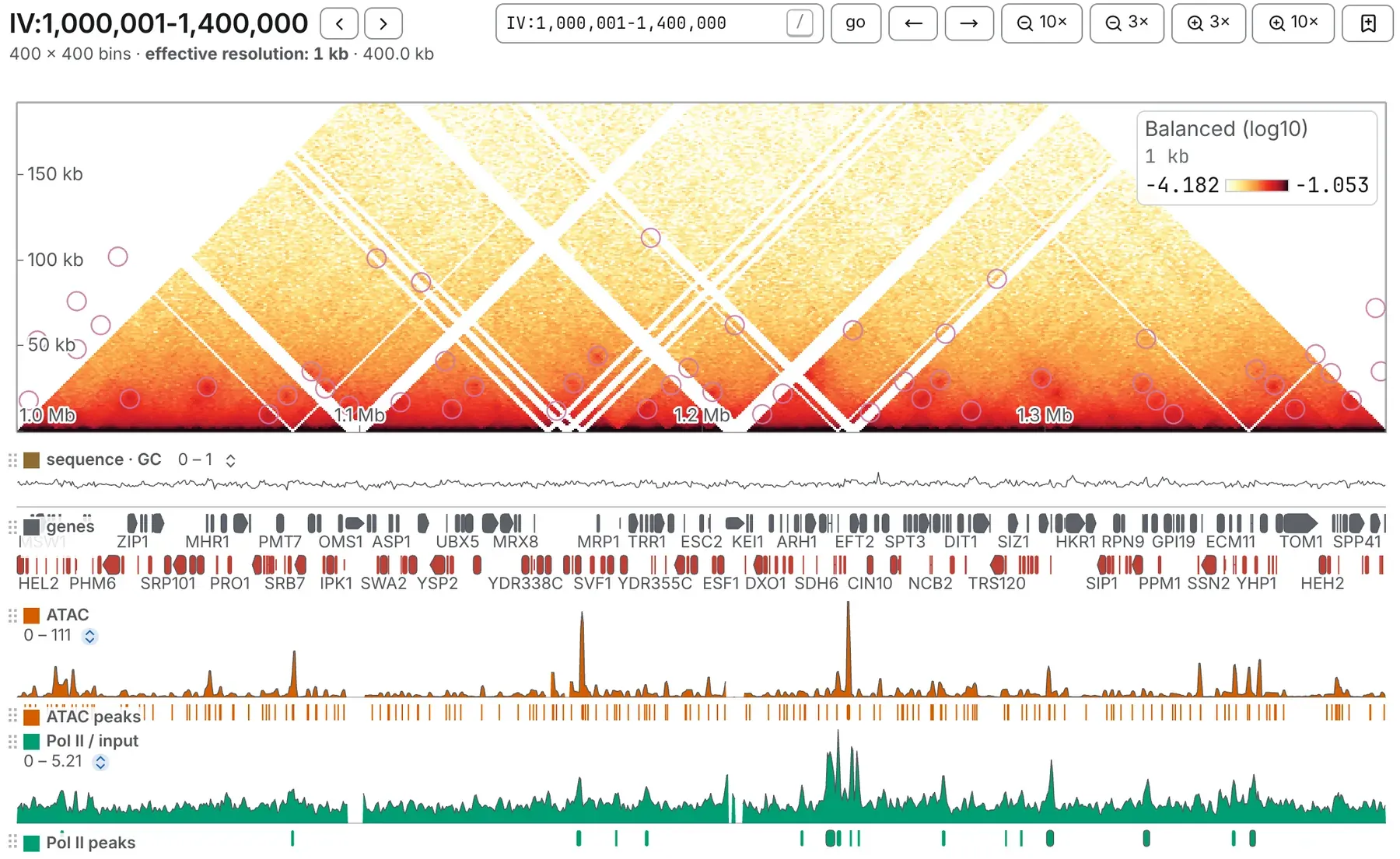
Turning a map
Section titled “Turning a map”Press the turn button in the picture row of the Map card, in the Aesthetics panel. Its
icon is the shape a press gives: a triangle, or a square once turned. A link asks for it with
flip=true.
- It is offered only on one sequence against itself, at bin level: a chromosome or a window of one. A circular sequence framed across its origin with ori turns like any other.
- A map opens square unless its link says otherwise, and once turned stays turned as you move around the same file.
- In a deck it turns every map, and every band reaches as far from the diagonal as the first map’s.
Reading a turned map
Section titled “Reading a turned map”- A cell sits above the midpoint of its two bins, at half their separation. Nothing is stretched: a domain’s two edges meet at a right angle.
- The ruler up the side reads separation: a contact between two places 100 kb apart reads 100 kb.
- The two top corners are blank, not zero: their contacts reach outside the window that was read.
- Turning does not change the colours.
- Pointing at the map draws an X through the contact, the two lines along which one of its ends stays put (a V near the axis), and a hairline down the tracks under each end. Pointing at a track draws a V above it: every contact that place takes part in, either side.
The size of the band
Section titled “The size of the band”Drag the bar along the top to make the band taller or shorter, and either end to make it wider or narrower; it stays centred and the tracks follow. Double-click a handle for all the room there is. It opens as wide as the panel allows and a quarter as tall.
Zooming changes what the band holds, not its size, and there is no panning up or down. This browser keeps the size for every tab and after a reload, and every map of a deck shares it.
Two maps in one turned square
Section titled “Two maps in one turned square”A square of two files, or of two readings of one (Comparing two maps), turns into two bands mirrored about one axis, each half the height: the first file grows up, the second down, each named on its own side. The ruler counts outwards both ways, and a pointer in the lower band reads the lower file. A ratio or a difference stays one band.
Tracks and marks
Section titled “Tracks and marks”Every track is drawn under the band, whichever edge of the square map it was on, and a track on two edges appears once. Turn the map back and each track is where you put it.
Marks follow the places they name:
- a line becomes a V standing on the axis, carried straight down through the tracks;
- a domain, or a rectangle on the diagonal, becomes a triangle, its apex at the height of its span;
- a loop becomes a dot at the height of its span, and an arrowhead stands above the dot it names, pointing down at it;
- a rectangle off the diagonal becomes a parallelogram leaning at 45°.
A call further from the diagonal than the band reaches is not drawn.
What a drag means
Section titled “What a drag means”On a turned map, every drag works along the bottom axis:
- a plain drag pans along the axis;
- ⌥ Option-drag (Alt on Windows and Linux) selects a full-height band and opens that stretch as a window; the map’s corner says ⌥ + drag to zoom into a stretch;
- Shift-drag, in either direction, zooms to the stretch and copies its coordinates.
draw on map, on the Manual annotations card, is the exception: it reads both ends of the drag in the square, so press over one contact and let go over another to draw the rectangle they span. Hold Shift for the square on the diagonal through the two places.
The diagonal lock is greyed while the map is turned.
Documentation of chromosomix v0.20.0 · built from 40ec1ec · source