
3D models beside the map
A 3D model, a file of beads placed in space, opens in a cell beside the map, linked to it both ways. Its formats are on 3D models. Making a model, or measuring one against the map, are analyses: Model from the map, Model versus map and Spatial tracks.
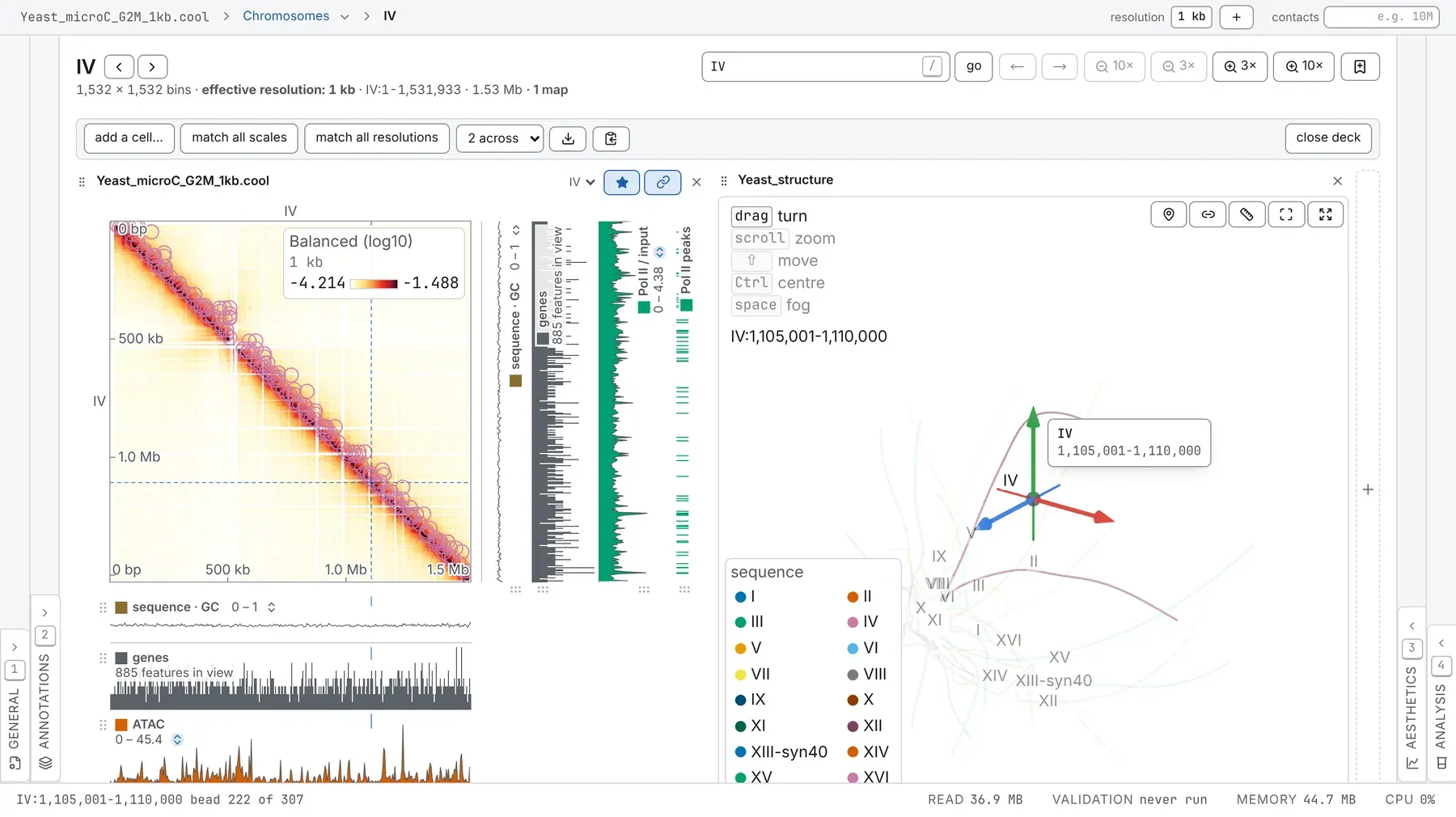
Opening a model
Section titled “Opening a model”- Drop a g3d, a
.3dg, a bed3d or a PDB that chromosomix wrote on the window, or open it by its address (Opening files). - Drop it on the Structures card of the Annotations panel (2), or click its Load a structure zone.
- With maps side by side, press add a cell… then add a 3D structure, or drop it on an empty cell.
- Run Model from the map.
Each model opens in a cell of its own. On an empty window, it opens a 1D browser of its genome, with the model taking the screen; show the 1D browser in the deck’s bar brings the tracks back.
Its row on the Structures card (grip, colour, name, eye, ×) reads like
2,412 beads · 5 kb · 16 sequences, where 5 kb is the file’s bead spacing, not the map’s bin size.
The cell
Section titled “The cell”The legend in the cell’s corner lists the gestures:
- drag turns the model, without limit; scroll or a pinch zooms;
- ⇧ and a drag, or a right-button drag, moves it;
- ⌘ on a Mac, Ctrl elsewhere: click a bead with it held to turn about that bead; tap it alone to show or hide the centre;
- space held while you scroll moves the fog forward or back;
- the arrow keys turn the model while its canvas has the focus.
The corner’s buttons are Mark a bead, Mark a loop, Measure, one that frames what the maps show, and Enlarge the model, with every setting beside it, which fills the window with the model and puts the settings in a sidebar you can resize or hide. A few single-letter keys work only there (Keyboard and command palette).
The bar under the picture sets the cell’s height: drag it or use the arrow keys, and double-click it to give the height back to the row. Type in the cell’s heading to rename the model. The cell’s × closes the cell, not the model.
A right-click without a drag opens the cell’s menu: Copy this copies the model alone as a PNG, and the Marks group hides the marks on the bead under the pointer, or all of them.
Hover, both ways
Section titled “Hover, both ways”Point at a bead and every map and track marks its place, and the status bar names it. Point at a cell of a map and the beads at its two ends light up, joined by a dashed chord; point at a track and the bead at that place lights. The pointer takes the nearest bead within 14 pixels.
Two switches shared with the map govern this: crosshair (the lit beads, the chord and the hovered bead’s halo) and tooltip (the card naming the bead). Beside a map they are on the Map card, otherwise on the shared row of the 3D structure card.
Clicking a bead
Section titled “Clicking a bead”- A click pins the bead, for spatial distance to pinned bin and contacts with pinned bin.
- A Shift-click marks the bead’s place on every map and track.
- A double-click takes the maps to the bead; on empty space, it puts the camera on what the maps are looking at.
Three corner buttons arm a mode, one at a time, until you press the button again; the legend’s top row names it. No key arms them.
- Mark a bead: each click marks a bead’s place on every map and track, as a line on both axes.
- Mark a loop: click two beads to put an arrowhead on the contact between their places; the model draws it as a chord. Esc lets go of the first bead.
- Measure: drag from one bead to another. The card lists each measurement, with both places, the distance and the separation along the sequence (or across sequences); its × removes it.
These marks are ordinary manual annotations.
A model has no physical unit. A file’s model is in the file’s units; one made by Model from the map is scaled to a root-mean-square radius of one. The genomic ruler, the bead spacing and a measurement’s separation give the genome’s scale.
The 3D structure card
Section titled “The 3D structure card”The settings are the 3D structure card of the Aesthetics panel (3), after the Map card, whenever the deck has a structure cell. Its rows:
| Row | What it sets |
|---|---|
| compare with | another model, superposed on this one |
| in the frame of | another model, into whose frame this one is turned |
| drawn as | beads, sticks and a tube, in any mix; the tube alone by default |
| overlays | the sequence names; a genomic ruler (ticks like 500 kb); Telomeres, a yellow bead at both ends of every chain, marking only where it ends; the centre and axes (x red, y green, z blue), on by default |
| colour by, colour scale | the colouring and its ramp |
| bead radius, tube radius | sliders |
| haplotype | on a phased model, both homologues or one |
| outside window | ghost (the default, at an opacity of 0.1), hide or show beads outside the maps’ window |
| loops as chords | a set of pairs drawn as chords |
| fog | depth fog, and how far back it starts |
| depth slab | keeps what lies within this fraction of the model’s reach of the centre, front and back; all the way right is everything |
| shared | the legend, crosshair and tooltip switches no other card offers |
| measurements | the distances measured |
| camera | front, top, side, the turntable, turn together, and replant the axes |
| frame | the window, everything, and two mirrors |
| export | the figure: see Exporting a model |
A gap in a chain is drawn as a dashed line. replant the axes lays the axes along the current view without moving the model; a ⌘-click or Ctrl-click on a bead moves the centre there and replants them too. Picking, measuring, the names and the export follow the mirrors.
Colouring the model
Section titled “Colouring the model”colour by offers:
- sequence (the default), linear position along the sequence, and haplotype on a phased model;
- manual annotations: a line colours its bead, a rectangle its run of beads;
- spatial distance to pinned bin, in the model’s units;
- contacts with pinned bin: the lead map’s row through the pinned bead, a virtual 4C in space, on the map’s transform, range and colour map; a pair the map never counted is the bottom of the scale;
- the file’s further columns (from the file), each track (· track) and feature set
(· features), and feature names such as
AandBas categories (· names); - with compare with set, displacement from the same bead in the other model.
A track colours the beads on its lane’s limits, so bead and lane agree. colour scale, offered only for a ramp, defaults to the colouring’s own (the lane’s or the map’s colour map); choose another, or under a track white to the track’s colour.
The key is a control
Section titled “The key is a control”- Under sequence, a swatch sets a colour; a click on a name ghosts that sequence, a double-click shows it alone, and a second brings every sequence back.
- Under manual annotations, a colour picked changes the mark everywhere; a click hides it, as its eye on the Manual annotations card does, and a double-click shows it alone.
- Under a feature set’s names, a colour picked for a name is its colour across the set, on its lane too.
- Under a track, type the scale’s ends to set the lane’s limits (Enter commits, Escape leaves them, Tab goes from bottom to top); the arrow after a fixed range puts the track back on autoscale.
The map’s legend switch hides the key.
Chords and names
Section titled “Chords and names”loops as chords draws a set of pairs, such as a BEDPE or a task’s loop calls, as chords between the beads of their anchors; choose manual annotations to draw your arrowheads. Only loops touching the window are drawn, 600 at most, and a switch beside the set shows or hides them. The sequence names under overlays also write your bookmarks on the model, at their middle beads.
Comparing two models
Section titled “Comparing two models”compare with matches the beads two models share by place on the genome (and by haplotype where both are phased), then rotates, scales and moves the other model onto this one, as a thin grey tube. The card gives how many beads matched and their RMSD; under four, there is no fit.
in the frame of is the same fit the other way: this model is turned into the other’s frame, and the other is not drawn. Set it in one of two cells and switch on turn together in both: the two turn as one.
A model made from contacts is fixed only up to reflection: if two models of one map will not line up, mirror one first (frame row).
Several models, several views
Section titled “Several models, several views”- The eye on a model’s row opens a cell for it, or closes every cell drawing it.
- Drag the row’s grip onto an empty cell or a
+edge of the deck to draw the model there, or onto another model’s cell to swap it in. - Each cell has its own camera, height and turntable; drawing style, colouring, mirrors and axes are the model’s, shared by all its cells.
turn together, on the camera row, shares the camera’s angles between the cells that have it on, each keeping its own centre and zoom. The cell you switch it on in leads.
With two structure cells or more, the 3D structure card sets the one whose star is lit, named under its title. Press that star to set every structure cell at once, without compare with, in the frame of, the measurements and the export. A model that opens later does not take the star.
Exporting a model
Section titled “Exporting a model”A figure
Section titled “A figure”The export row at the foot of the 3D structure card has a resolution, a format, a save button and a copy button, which copies a PNG. PNG is the picture as your graphics card lit it; PDF (vector) draws the same picture, beads, sticks and tube as shaded paths and names as text. Both keep the gaps, centre, ruler, marks, telomeres, measurements, depth slab and fog, on white, framed by a thin rule. Beside maps, the model is also a cell of the deck’s figure (Figures and export).
The model itself: bed3d
Section titled “The model itself: bed3d”export bed3d, on the model’s row of the Structures card, writes chrom start end x y z
(with a haplotype column when phased) to six decimals, under a # line naming the model, what it was
made from and when. It opens again here and in g3dtools, and holds a model of any size.
PDB, for PyMOL and ChimeraX
Section titled “PDB, for PyMOL and ChimeraX”PDB beside it writes the fibre for molecular viewers:
- one atom per placed bead;
- one chain per sequence and haplotype, residues numbered from 1 along each, so colouring by chain tells chromosomes and homologues apart, and a rainbow by residue runs end to end;
- bonds between neighbouring beads only, none across a gap or between chains;
- coordinates scaled to suit PyMOL’s spheres, sticks and cartoon, in no physical unit.
A PDB holds at most 99,999 beads, 9,999 in one chain and 9,999 chains; past that the PDB button is
greyed (its tooltip says why), and the bed3d still holds the model. From the command line,
chromosomix reconstruct3d with --out writes both.
What is kept
Section titled “What is kept”A model’s drawing, colouring, pin, mirrors and axes stay with its row, and each cell’s camera, height and turn together with its place in the deck, through a reload, a saved workspace and a shared link (Sessions, workspaces and links). After a reload, drop a model from your disk again. A task’s model comes back with recompute, since its coordinates are not kept.
Documentation of chromosomix v0.20.0 · built from 40ec1ec · source