
Reading a contact map
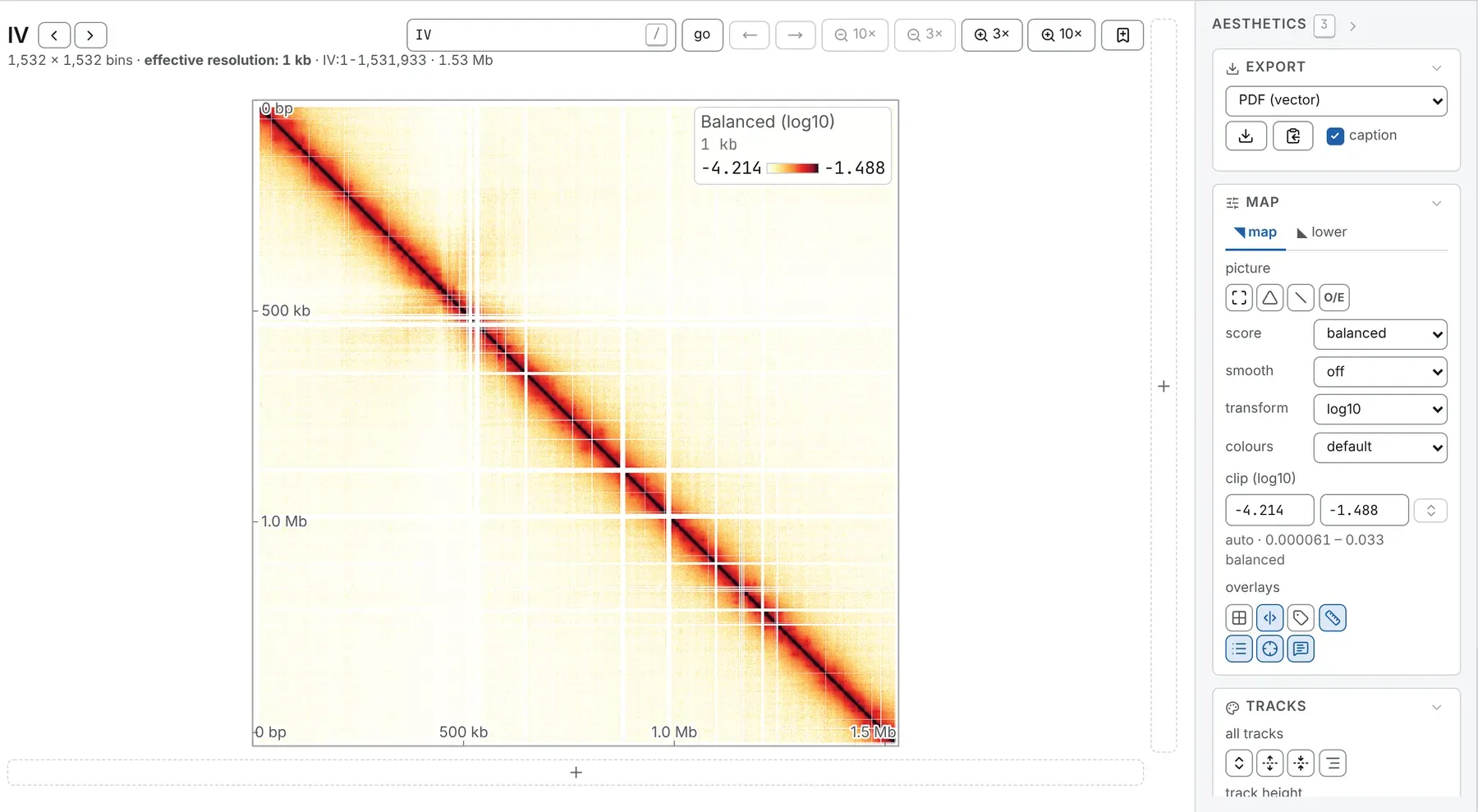
The line under a map’s heading gives the block’s size and what one cell is worth:
1,532 × 1,532 bins · effective resolution: 1 kb.
The Map card, in the Aesthetics panel, sets how the map is drawn, from top to bottom: picture (undo every pan and zoom, the 45° turn, the diagonal lock, O/E), compare with a second file, score, smooth, transform, colours, clip and overlays. All but the overlays and the diagonal lock are in the link.
Resolution
Section titled “Resolution”resolution, at the far end of the bar above the map, lists the bin sizes the file stores as stops under a slider; - and + step one coarser or finer. A file opens a third of the way up from its finest resolution.
The + after the stops opens Add a resolution: a whole multiple of one of the file’s bin sizes,
such as 3 kb on 1 kb bins, summed from the stored bins. It shows as 3 kb*, its × removes it, and
a file takes up to twelve. Counts are exact, but balanced values are an estimate, since
cooler zoomify --balance balances each resolution on its own. A task run while it is drawn reads
the map at that resolution.
A wide window may be drawn coarser, as the summary line says
(Resolution and the zoom). On the whole genome,
level, at the head of the Sequences card (General panel), switches between bin × bin
and chromosome × chromosome.
What the cells hold
Section titled “What the cells hold”score sets what the cells hold:
| Score | Each cell holds |
|---|---|
| counts | the contacts stored for that pair of bins |
| balanced | the counts with each bin’s bias divided out by the file’s weights, when it has them |
| VC, VC √, ICE | a normalisation computed from the block on screen |
| expected | what the cell’s distance from the diagonal predicts: the baseline of an O/E |
| arm decay | that baseline along both arms of a circular sequence |
| correlation | the correlation between rows of the balanced O/E, on a file with weights |
| a column’s name | another column of the file’s own pixel table |
A file with weights opens balanced on log10; one without, counts on log1p.
Balanced or raw counts
Section titled “Balanced or raw counts”For balanced, a cooler’s weights are those cooler balance wrote, applied as cooler applies
them; a .hic brings its own normalisation (SCALE, else KR, else the coverage ones), which the
normalisation row of the File card (General panel) names. A bin the balancer dropped has
its row and column drawn as paper, not as zero.
VC, VC √ and ICE normalise a file without weights, or another way; on a window they are the window’s normalisation, not the chromosome’s. Each agrees with cooler and cooltools cell for cell, to the map’s precision (How the results are checked). Juicer’s KR is not offered: it reaches the same weights as ICE.
Expected and correlation
Section titled “Expected and correlation”Far from the diagonal, expected averages few cells, so check it before trusting an O/E there. O/E is greyed while it is drawn.
correlation, the picture compartments are read from, is drawn for square blocks of up to 4,096 bins a side. The Compartments task uses the same arithmetic.
The colour scale
Section titled “The colour scale”transform maps a value onto the ramp: log1p for counts, log10 for balanced values, log2
for ratios (twice and half equally far from no change), or none, on which little but the diagonal
shows.
clip sets where the ramp starts and where it saturates, in the transform’s units, as its label
says (clip (log10)); the line under it gives the range in the readout’s units,
auto · 0.000066 – 0.089 balanced. Type a bound to fix it; ⇅, or a change of transform, puts it
back to automatic. The automatic range is measured on the block that was read, so the colours hold
still as you pan and zoom inside it: from 0 to the 99th percentile of the non-zero counts, or for
balanced values from the 1st to the 99th percentile of the cells that hold a contact.
The key, in the map’s top-right corner, names the score and the transform, gives one cell’s size and shows the two bounds: click either to type it, and empty it for automatic. legend, under overlays, hides it.
colours picks the ramp; a ✓ marks those safe with a colour-vision deficiency.
| Ramp | |
|---|---|
default |
white through yellow and red to black: what a map opens on |
afmhot_r, afmhot |
matplotlib’s ramps of those names |
Reds |
white, then red to a dark maroon |
cividis ✓, viridis ✓, magma ✓ |
even in lightness |
RdBu_r |
diverging, red for more, blue for less: what a ratio or an O/E opens on |
BuWtRd |
diverging, with more contrast, white at its middle |
seismic |
diverging: chromosight’s pileup ramp |
Observed over expected
Section titled “Observed over expected”O/E, in the picture row, or e, divides each cell by the mean over every pair of bins as far apart in this block, with one value for each pair of different sequences. It works on any score, balanced counts most often.
It switches the map to log2, a range symmetric about 1 and RdBu_r: red for more contacts than
expected, blue for fewer. Switching it off restores your transform, colours and clip. A cell where
nothing was observed is drawn as paper, not as the strongest depletion.
On a sequence declared circular, or whose origin has been set, two buttons join O/E. arms also divides out the decay along the secondary diagonal through the origin, leaving a bacterial chromosome’s compartments. ori, on a circle, frames the sequence with its origin in the middle (press again for its first base). Declare circles and origins in the Chromosomes table (Circular sequences).
Smoothing
Section titled “Smoothing”smooth averages each cell with its neighbours: 3 × 3, 5 × 5, 7 × 7, or adaptive, whose window grows until it holds enough contacts (serpentine’s criterion, as a sliding window). It turns the O/E on. Smoothing comes before the O/E and the ratio of two files, so a zero cell among contacts is no longer a hole. Past 16 million cells, adaptive falls back to 3 × 3, and the note under the heading says so.
Drawing maps to one total
Section titled “Drawing maps to one total”A deeper library is brighter everywhere. The contacts box, after resolution at the far end
of the bar, draws every map in the tab to one total before it is shown or analysed: type 10M,
23,000,000, 2.5e7 or 500k and press Enter, or empty it to read the files as stored.
Its tooltip gives each map’s own total.
A deeper map is subsampled to exactly that total, as cooltools random-sample --count N --exact
does; a shallower one is oversampled through Boost-HiC, with new contacts drawn from a
probability map built from it. An oversample is an inference, and wherever the map is named it says
which was done.
The draw has a fixed seed, so one total is one map in every view, after a reload and on the command
line (--contacts). Balanced values are rescaled with it, so a subsampled map is
not drawn fainter. Every task reads the drawn map, and a saved figure’s caption says so.
With two maps or more (a deck, or a second file in the lower triangle), two
chevrons after the box type the shallowest or the deepest map’s total. The link carries the total as
contacts=, and it stays with the file across sequences.
What is drawn over the map
Section titled “What is drawn over the map”overlays switches dividers between sequences (d), breaks, the same boundaries as ticks outside the plot (m), block labels (l), base-pair ticks (k), the legend, the crosshair (x) and the tooltip card (p). This browser keeps them; a link does not.
Hovering a cell
Section titled “Hovering a cell”Point at a cell and a card reads its positions, counted from 1, their distance and its value. On an O/E map it adds the count the ratio was read from, which says whether to believe it; with a second file, both files’ counts. The status line at the foot of the window keeps the reading; tooltip (p) hides the card. Shift snaps the reading onto the diagonal.
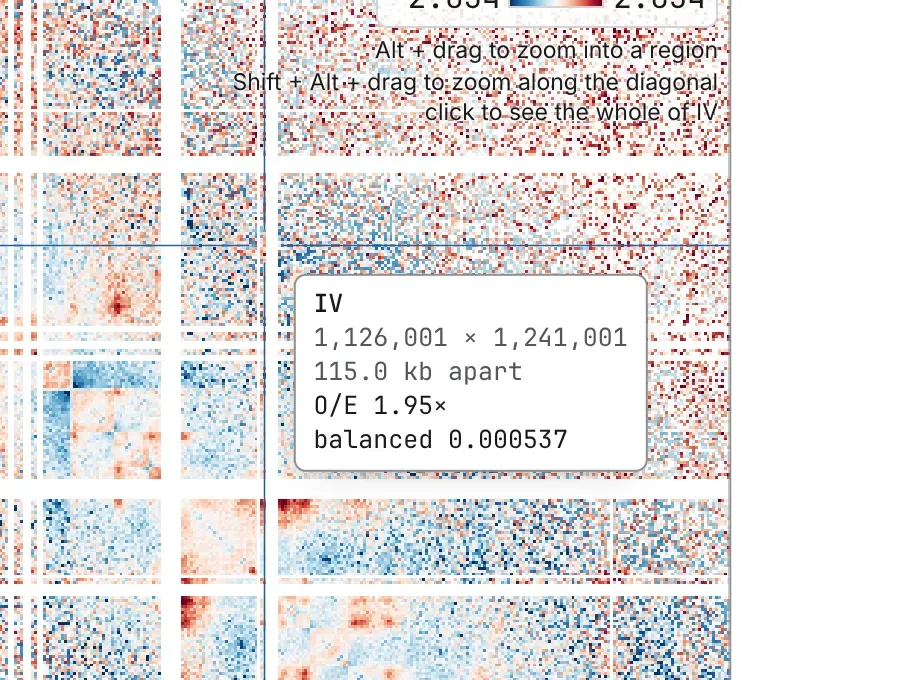
Right-click a cell for:
- Copy this: the cells alone, as a PNG with no axis, key or frame;
- Mark this point: a Vertical line, Horizontal line, Crosshair or Arrowhead at the cell, added to the Manual annotations card;
- Copy coordinates: the cell’s two positions, counted from 1, without separators.
Documentation of chromosomix v0.20.0 · built from 40ec1ec · source