
Embedding in a web page
The viewer goes into any HTML page as an <iframe>, with nothing to install and no script to add.
An iframe
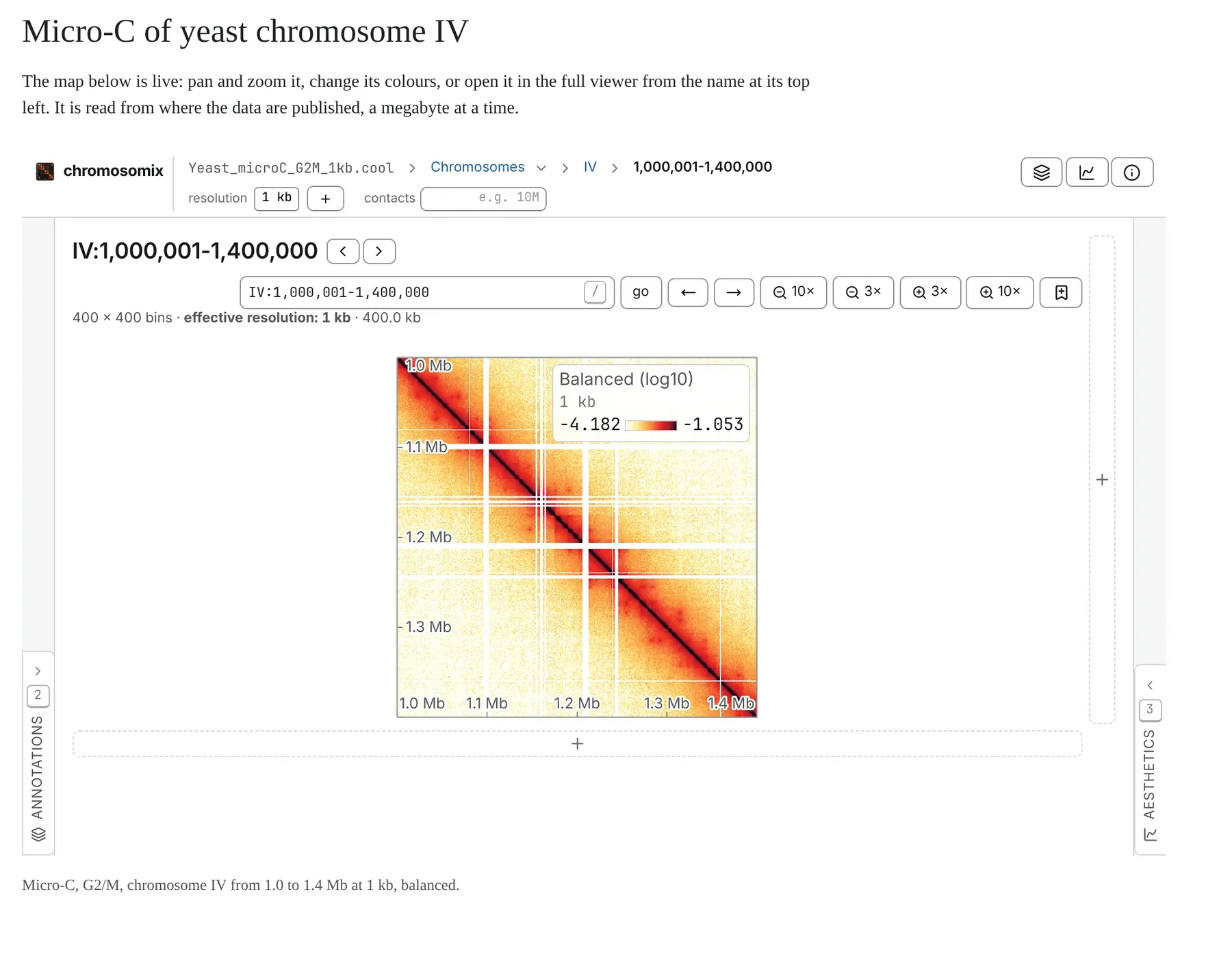
Section titled “An iframe”<iframe src="https://chromosomix.app/?embed=1#uri=https://rsglab-data.s3.eu-west-3.amazonaws.com/demo/yeast/Yeast_microC_G2M_1kb.cool&view=region®ion=IV:1000000-1400000&transform=log10&balance=true" width="100%" height="640" loading="lazy" style="border: 0" title="Micro-C of yeast chromosome IV"></iframe>The src is the address of a view open in the app, with ?embed=1 put before its # (Link keys).
- A link from the share dialog works too, and
?embed=1&config=<address>opens a published workspace with its tracks, colours and marks. - With nothing after
?embed=1, the frame is the landing page with Load files alone. - The files must be on a host that lets the viewer read them (Hosting your data); the page around the frame needs no particular headers.
- A file on your own disk cannot be embedded for others.
The view fills the frame and follows its size: a taller frame draws a larger map.
A frame the reader can resize
Section titled “A frame the reader can resize”Put the frame in a box the browser lets the reader resize by its corner. The padding keeps the corner’s grip clear of the frame, and the script lets the pointer through the frame while the box is dragged, without which the drag stalls as soon as it shrinks the box:
<div class="chromosomix-frame" style="resize: both; overflow: hidden; width: 100%; height: 640px; padding-bottom: 14px; box-sizing: border-box"> <iframe src="https://chromosomix.app/?embed=1#uri=https://rsglab-data.s3.eu-west-3.amazonaws.com/demo/yeast/Yeast_microC_G2M_1kb.cool&view=region®ion=IV:1000000-1400000&transform=log10&balance=true" style="display: block; width: 100%; height: 100%; border: 0" loading="lazy" title="Micro-C of yeast chromosome IV"></iframe></div><script> for (const box of document.querySelectorAll('.chromosomix-frame')) { box.addEventListener('pointerdown', (event) => { if (event.target === box) box.querySelector('iframe').style.pointerEvents = 'none' }) } addEventListener('pointerup', () => { for (const frame of document.querySelectorAll('.chromosomix-frame iframe')) frame.style.pointerEvents = '' })</script>Pin a release
Section titled “Pin a release”https://chromosomix.app/ is the newest build. Every release is also kept for good at its own address, with the same query and fragment:
https://chromosomix.app/v/v0.19.0/?embed=1#uri=…A paper’s figure should name one. A copy on your own server is framed the same way (Running your own copy).
What an embed keeps and drops
Section titled “What an embed keeps and drops”- It keeps the view, its gestures and shortcuts, and the Annotations and Aesthetics panels, folded as strips on either edge. Add
&panels=opento the query to open both (panels=annotationsorpanels=aestheticsfor one). A reader can still drop a file of their own on it; nothing is uploaded. - It drops the header, the tab strip, the offer to restore the last workspace, the status bar, the store catalogue, the console, and the Files, General and Analysis panels.
- It remembers nothing. No browser storage, no history, no offline install, no notice of a newer build: it shows what its
srcsays on every load.
Its one bar
Section titled “Its one bar”- On the left, the chromosomix mark and name, which open the view where the reader is in the full app, in a new tab; then the breadcrumb.
- On the right, buttons for the Annotations and Aesthetics panels (hidden while a panel has nothing to show), and About this viewer, which names the build in the frame and its source.
In a narrow frame the bar takes two lines; at phone width the contacts box goes and each bin size is a button. Notes and refusals appear under the bar, as in the app.
Driving it from the page
Section titled “Driving it from the page”The page around the frame can move the view, add tracks and follow the reader with six postMessage messages, each an object with a type, listed on Embedding messages.
- The page speaks first. The frame sends
chromosomix:readyonce, then nothing until the page sends it something: put your listener in place before the frame loads. - Only the page that framed it is answered, at the origin it spoke from, even a page opened from disk.
- Messages are carried out in order. A
chromosomix:navigatesent after achromosomix:addwaits for the files to open. - A navigate is a patch. Its
stateholds only the keys to change, as a link writes them;nullremoves a key. Thechromosomix:stateanswer says where the view actually went, without keys the frame cannot read. - Adding files needs 0.17.0 or later.
chromosomix:addtakes up to 64http(s)addresses; theacceptslist inchromosomix:readysays whether the build takes it. chromosomix:renderedmarks a finished picture, the moment for a screenshot: itsreport.statusisdrawn,gated(waiting for the reader to agree to a large read) orerror.
A worked example
Section titled “A worked example”Buttons that move the map, a track a link cannot carry, and a caption that follows the reader:
<iframe id="figure" width="100%" height="640" style="border: 0" title="Micro-C of yeast chromosome IV"></iframe><p>Showing <code id="where">…</code></p><p> <button data-region="IV:1000000-1400000">IV, 1.0–1.4 Mb</button> <button data-region="IV:1150000-1250000">IV, 1.15–1.25 Mb</button></p>
<script> const VIEWER = "https://chromosomix.app/" const DATA = "https://rsglab-data.s3.eu-west-3.amazonaws.com/demo/yeast/" const frame = document.getElementById("figure") const origin = new URL(VIEWER).origin const send = (message) => frame.contentWindow.postMessage(message, origin)
window.addEventListener("message", (event) => { if (event.source !== frame.contentWindow) return const message = event.data if (message?.type === "chromosomix:ready") { if (message.accepts?.includes("chromosomix:add")) { send({ type: "chromosomix:add", files: [DATA + "Yeast_ATAC.bw"] }) } else { send({ type: "chromosomix:where" }) } } if (message?.type === "chromosomix:state") { const state = message.state document.getElementById("where").textContent = state === null ? "the landing page" : state.region ?? state.locus ?? state.view } })
for (const button of document.querySelectorAll("button[data-region]")) { button.addEventListener("click", () => { send({ type: "chromosomix:navigate", state: { view: "region", region: button.dataset.region, region2: null, focus: null }, }) }) }
frame.src = VIEWER + "?embed=1#uri=" + DATA + "Yeast_microC_G2M_1kb.cool" + "&view=region®ion=IV:1000000-1400000&transform=log10&balance=true"</script>- The
srcis set last, once the listener is in place, soreadycannot be missed. - On
ready, the page adds the ATAC-seq track if the build takes files, or else asks where the view is. Either way achromosomix:stateanswers, then one on every move, which keeps the caption current. - Each button sends a patch: the region, with
region2andfocusset tonullto clear any off-diagonal block or zoom.
In a notebook
Section titled “In a notebook”The Jupyter widget and the R htmlwidget are this same frame, driven from Python and R.
Documentation of chromosomix v0.20.0 · built from 40ec1ec · source