
Peak calling
- In the app
- Analysis panel, under 1D tasks: Peak calling
- Command
chromosomix peaks- Reads
- Tracks and interval files, with or without a contact map
- Also known as
- peaks, yapc, narrowPeak, ChIP, ATAC
Peak calling finds peaks on a coverage track by their shape, as yapc does: a peak is a stretch where the smoothed signal curves down, so it needs no background model, and two summits on one shoulder are two peaks. A second replicate is tested with IDR, as ENCODE does. Use it on an ATAC-seq, DNase-seq or ChIP-seq track that has no peak file; FRiP, the metaplot and the overlap test read the result.
Running it
Section titled “Running it”Load the coverage (Tracks and features), open Peak calling on the 1D tasks card of the Analysis panel, choose it under track and tick the sequences; no map is needed. To test the peaks, choose a second replicate of the same experiment under replicate. It starts on None — no IDR, because IDR between two different experiments reports their disagreement as irreproducible peaks.
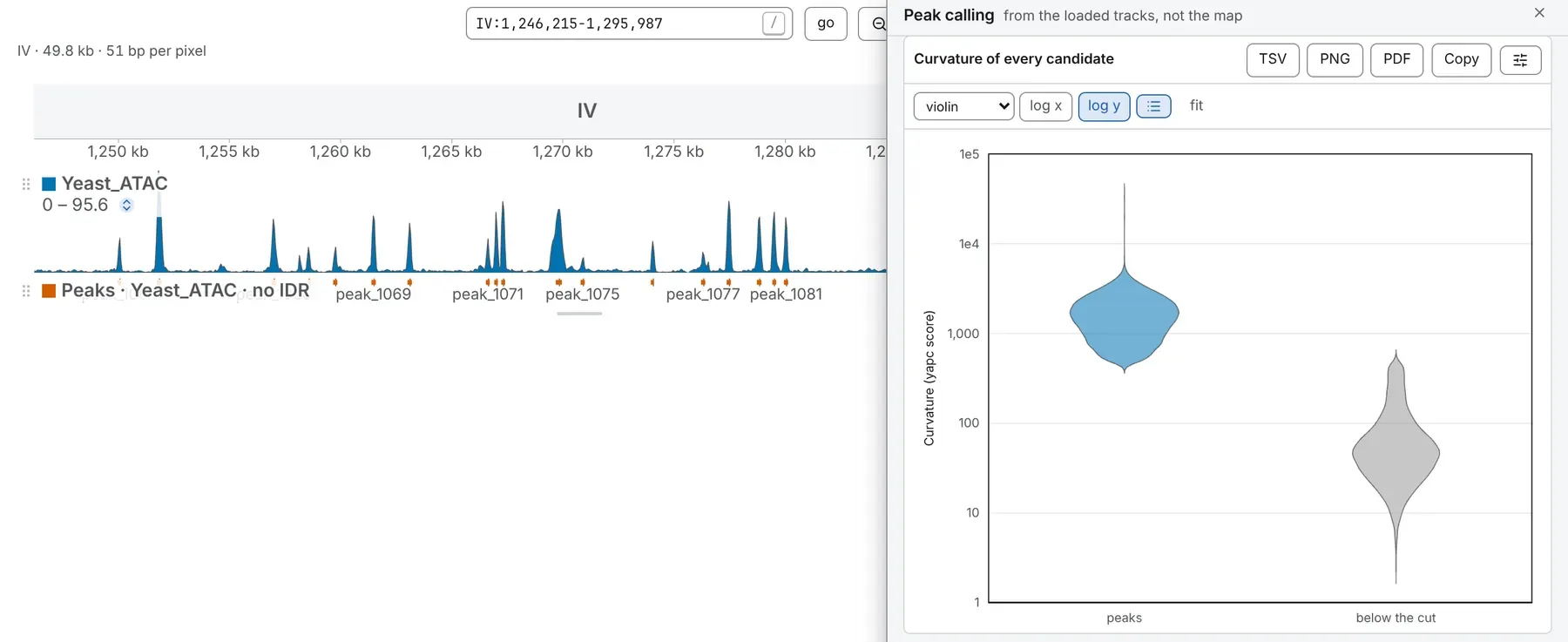
The peaks open on the Tracks card under the coverage, as Peaks · ATAC · no IDR or Peaks · rep1 + rep2 · IDR ≤ 0.05, each summit (its most concave base) drawn thick. The figure and the tables below are in the drawer.
The same run from a shell:
chromosomix peaks [<map>] --signal <signal.bw> [--<parameter> <value> …] --out <dir>Parameters
Section titled “Parameters”The defaults are yapc’s and suit narrow peaks. Change smoothing window for the assay: 75 to 200 bp suits most narrow peaks, and a wider window finds broader shapes. fixed half-width gives every peak one width about its summit. With one track, keep the strongest is the only cut.
| Parameter | Takes | Default | What it does |
|---|---|---|---|
| General | |||
track--signal <file> | a file: a signal track | — | The coverage to call on, as normalised; a bigWig, a bedGraph or a wig. |
replicate--replicate <file> | a file: a signal track; optional | not used | A second replicate of the same experiment; with one, IDR tests every peak. |
IDR threshold--idr <value> | 0.001, 0.005, 0.01, 0.05, 0.1 or 0.2 | 0.05 | Keep peaks whose global IDR is at most this. Read only under other settings of this task. |
sequences--sequences <name,…> | sequence names, comma-separated | Every sequence of the file when left out. | — |
list every peak--perPeak / --no-perPeak | on or off | off | One row per peak, with its summit, its scores and its IDR; long on a large genome. |
| Smoothing | |||
smoothing window--width <n> | a whole number, 1 to 2000, in bp | 150 | Yapc’s default; 75 to 200 bp suits most narrow peaks. |
smoothing passes--times <n> | a whole number, 0 to 10 | 3 | Rolling means applied to the second derivative. |
| Peaks | |||
narrowest peak--minWidth <n> | a whole number, at least 1, in bp | 75 | Concave stretches narrower than this are dropped. |
fixed half-width--halfWidth <n> | a whole number, at least 0, in bp | 0 | 0 keeps each peak’s concave bounds; otherwise this many bases each side of its summit. |
keep the strongest--truncate <n> | a whole number, at least 1 | 100000 | By each track’s curvature rank, before IDR; with one track, the only cut. |
What it writes
Section titled “What it writes”- intervals: a set of intervals: TSV, and BED (or BEDPE for pairs, or bed3d and PDB for a 3D model)
- table: a table: TSV
- curve: a curve: TSV
On the command line every file goes into --out as <file stem>.peaks.<output>.<ext>, and each TSV opens with # lines naming the build, the file and every parameter that produced it.
The BED’s score is −log10 of the global IDR with a replicate, as in yapc’s BEDs, and the curvature with one track. The tables show starts and summits 1-based and save them 0-based.
Reading the result
Section titled “Reading the result”A candidate’s score on each track is its curvature: how sharply the signal curves there, less the mean second derivative over the region.
With a replicate
Section titled “With a replicate”The note gives the IDR fit: its four parameters, the peaks it was fitted over and how many pass. A peak is kept when its global IDR is at most the threshold, 0.05 by default, as ENCODE uses; IDR thresholds shows how many each of yapc’s six thresholds, 0.001 to 0.2, would keep. A fit that ends at the edge of IDR’s parameter box is named in the note: the tracks do not rank their peaks like replicates, and its IDRs say nothing about reproducibility. IDR needs at least 20 peaks; with fewer, they are reported untested.
With one track
Section titled “With one track”There is no test of significance, and the lane’s name says so: the candidates are ranked by curvature and cut by keep the strongest. Choose the cut from the figure of every candidate’s curvature: on a real ATAC-seq track it is plainly bimodal, so lower keep the strongest to the size of the upper population and run again.
The tables
Section titled “The tables”- Per sequence: the concave regions, those wide enough, the peaks called and peaks per Mb.
- Every peak, with list every peak: start, end, summit, width and curvature on each track, and with a replicate the local and global IDR and whether it passes.
What to watch for
Section titled “What to watch for”- A candidate whose signal is constant for a whole kernel’s width, such as a run of the explicit zeros deepTools writes, is left out; a note says how many.
- A track missing a ticked sequence is read as zeros there, which lowers the mean the regions are called on; the run names it. If it has none of them, check that the track and the assembly spell sequence names alike.
Compared with yapc
Section titled “Compared with yapc”The task ports yapc 0.1 and the IDR 2.0.3 it thresholds by: in the validation the same peaks come out. Ties are broken by position, not at random, so a run gives the same peaks twice; where yapc has no answer, such as a sequence ending on an open concave stretch, chromosomix gives one and says which.
Documentation of chromosomix v0.20.0 · built from 40ec1ec · source