
The console
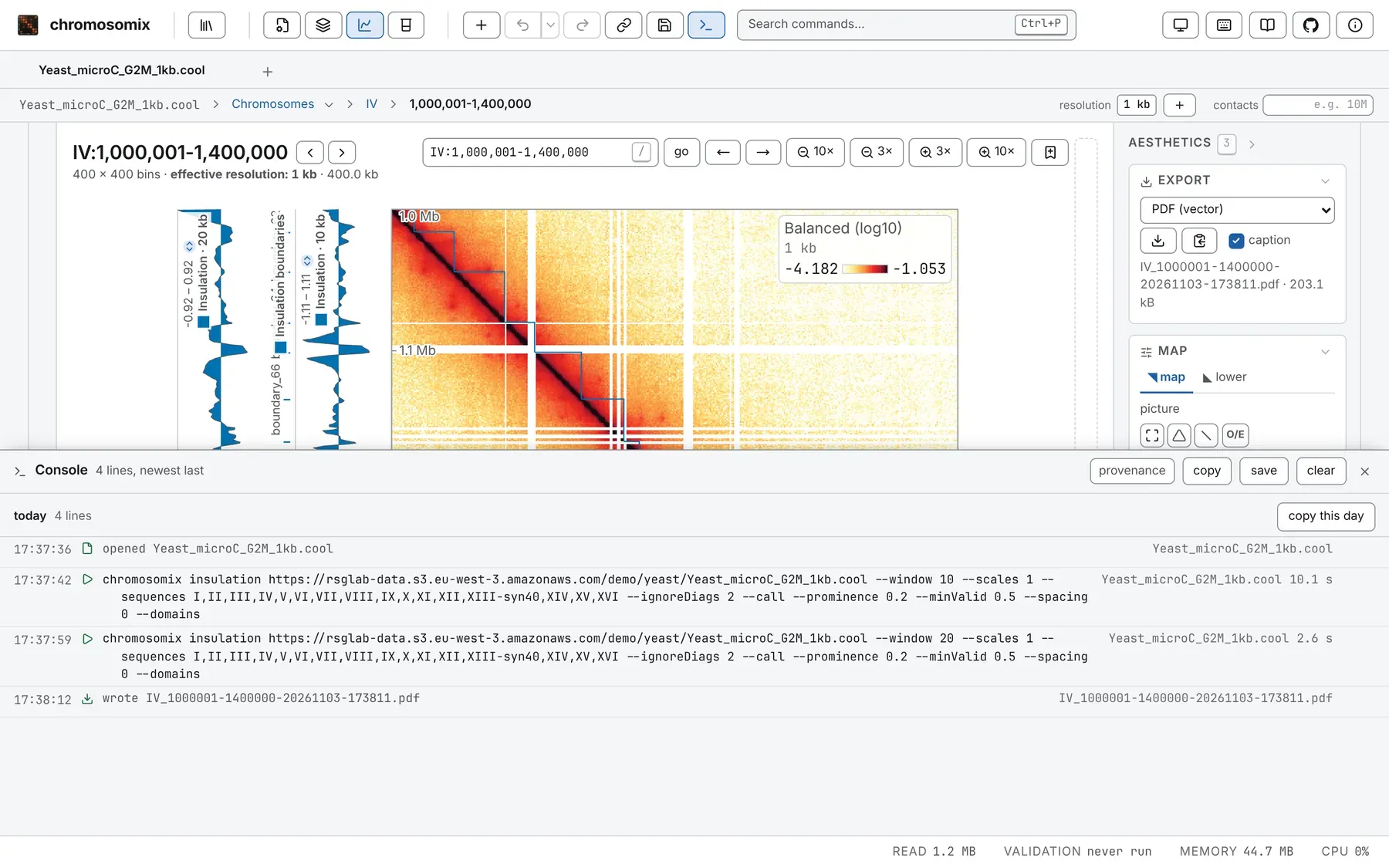
The console, along the bottom of the window, logs what this window has done. Every analysis you run
is written there, as it starts, as the chromosomix command that repeats it: tune a run on screen,
then take its line to a shell or a methods section.
Opening it
Section titled “Opening it”Press the terminal button in the header, after the share and save buttons, or Ctrl+backtick: Control, on a Mac too, and the key left of 1 (Ctrl+² on a French PC). The command palette lists it as Console.
Drag its top edge to resize it; its height, and whether it is open, are remembered. Escape or its × closes it, and it goes on recording. Every shortcut, and the Analysis drawer, keep working beside it.
What it records
Section titled “What it records”- An analysis run, one line per job (run on all maps over six maps is six lines, a task that reads tracks rather than a map one), written when the job starts, so a run that fails or is cancelled keeps its line, with the error under it. A run that could not start leaves a sentence saying why.
- A file opened, as
openedand its name. - A track loaded, as
loadedand its name; tracks brought back after a reload are not listed again. - A file written, as
wroteand the name you gave it: every export, figure, table and workspace.
Moving around is not recorded. Each row shows the time, a mark for its kind, whose tooltip gives its state (running, done, failed, cancelled or interrupted), the line, its file and how long it took. Copy this line, at the row’s end, copies that row.
The command on a line
Section titled “The command on a line”A run’s line, the command copy CLI command gives under a finished result, repeats the run exactly:
- it names every parameter, defaults included;
- it gives the window as the screen does, 1-based with digits grouped:
--window IV:1,000,001-1,400,000; - it adds, only where they differ from the default, what the view set without being a parameter: the
score (
--value), circular sequences and their origins (--circular,--origin), an.scool’s cells (--cell), the total the map is drawn to (--contacts) and an added resolution (--coarsen). A run on raw counts says--no-balance; - a file from an address is named by it, and read by range.
What a shell command cannot say, such as a window across several sequences or off the diagonal, or a
map drawn balanced but read raw, is written as a # note above it. See
From the app to a script, and the
command line reference for every flag.
Copying and saving
Section titled “Copying and saving”Copy one row with its button, a day with copy this day on the day’s separator, or everything with
copy in the header. save writes the same text as chromosomix-console-<stamp>.sh.
What you copy is a shell script that runs in the order it ran: everything but the commands is a #
comment, a failure as # failed: and its message. A saved file opens with:
#!/bin/sh# chromosomix console, saved 2026-11-03T14:52:33.000Z# Commands are bare; everything else is a comment.provenance, a switch in the header, off by default, shows each row’s full record above it (the
build, the task and its version, the view and every parameter), and copying and saving then take it
too; the # notes stay either way. clear forgets every line but stops nothing. With nothing
recorded, copy, save and clear are greyed.
How long it is kept
Section titled “How long it is kept”The console keeps at most 500 lines and seven days, in this browser, and sends nothing anywhere. Two windows share one log, so clear empties both. A run still going when its window closed comes back interrupted. A view embedded in another page has no console.
It is listed as Console under What this browser is remembering in the command palette, where forget everything drops it (Sessions, workspaces and links).
Documentation of chromosomix v0.20.0 · built from 40ec1ec · source