
Maps side by side
A deck is a grid of contact maps, stacks of tracks and 3D models in one tab, moving as one. Every map shows the same place, each on its own colour scale. The maps must share coordinates but not a grid: resolution, file format and the spelling of their sequences may differ.
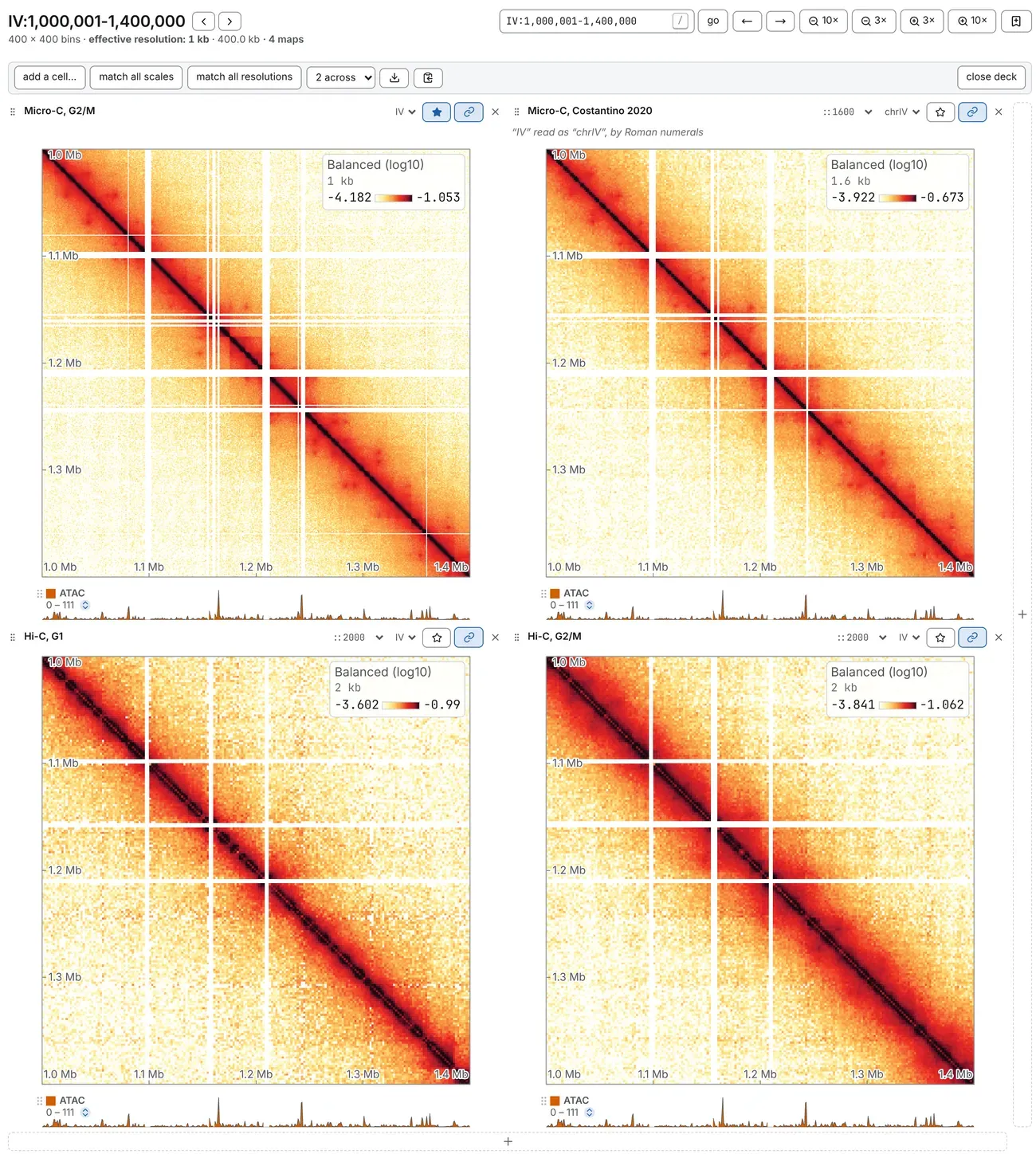
Making a deck
Section titled “Making a deck”The + along the map’s right edge adds a column of cells, the one along its bottom a row. Fill a
new cell by dropping on it:
- a contact map (or click the cell to choose one);
- a track file or a Tracks card row, for a cell of tracks;
- a 3D structure or a Structures card row, for its model.
A file dropped on a + adds the cells and fills the nearest. A map dropped on an open map opens
beside it, and several dropped at once fill a deck.
In a deck, add a cell… in the bar offers choose a file…, a box for a map’s address with add, add a 3D structure and add a tracks cell. The command palette has Add a map beside this one. The across picker (2 across, 3 across, …) sets how many cells make a row. An empty cell stays where you put it, and a link keeps it.
Moving together
Section titled “Moving together”A pan, a zoom, a typed locus or a step to another sequence on any map moves them all, and the heading above the grid steers every map. Pointing at one map marks the same place on the others. Maps stay together in base pairs, the coarser rounding outward. A window that runs off the end of a shorter sequence slides back inside it at the same width.
The chain on a cell’s heading is lit while the map follows; press it to let the map go, and again to bring it back. A map off the chain takes its own window: draw a box on it with ⌥ Option (Alt on Windows and Linux) held. The window shows as a pill in its heading, with a button that zooms out three times and a × back to the deck’s window.
The sequence picker beside a map’s name opens a whole sequence. On any map but the first, it takes the map off the chain, so one map can show IV while the next shows V. On the first map it moves the whole deck, as does a box drawn on a map still on the chain.
The star
Section titled “The star”The starred map, the first until you star another, is the one the Map card (Aesthetics panel) sets, the File card (General panel) describes and the Analysis panel’s tasks run on (How analyses run). Press the filled star to star none: the Map card then sets every map at once, and says so: every map — all 4. With no map starred, only the tasks that read tracks alone can run.
What is shared, and what is not
Section titled “What is shared, and what is not”- Shared: the region, the sequence or selection, the level, pan and zoom (unless a map is off the chain) and the 45° turn.
- Each map’s own, starting as the first map’s: the resolution (where its file has that bin size), the score, O/E, smoothing, arms, transform, colours and clip.
Clips stay apart, since libraries of different depth do not share one. Two buttons in the deck’s bar, greyed while no map is starred, put the maps on one footing:
- match all scales copies the starred map’s clip to every map, once;
- match all resolutions reads every map at the starred map’s bin size, where its file has it.
Changing the first map’s resolution in the bar changes the deck’s: every map follows, or says why it cannot. For one depth, use the chevrons after the contacts box (Drawing maps to one total).
When a map cannot follow
Section titled “When a map cannot follow”One sequence name at two lengths, differing by more than a cell of the coarser map, is two different places: the map that differs is still drawn and exported, but off the lock, with a line under its heading saying why. A file with no sequence of that name is refused in its own cell, with the names it has. On a turned deck, a map whose block does not reach as far from the diagonal as the first map’s cannot follow, and says so.
Arranging the cells
Section titled “Arranging the cells”Every cell and every map is drawn at one size, so the pictures line up. A stack of tracks too wide for its cell scrolls sideways.
- Drag a cell by the grip before its name onto another cell to swap the two.
- The Contact maps card (Annotations panel) lists the maps in grid order. A row’s eye
takes the map out of its cell and keeps it, dimmed; its × lets the map go; its grip moves the
map’s cell, or puts the map on a cell or a
+edge. Drag the first map’s row onto an empty cell to open the same file again, at a second window or colour scale. - The × on a cell’s heading hides its map, as the eye does. The first map’s cell can be hidden too, and still steers the deck; show, in the deck’s bar, puts it back.
- close deck, at the far right of the bar, closes every cell but the first map’s. The other maps stay on the Contact maps card, hidden, and a track drawn only on them moves to the first map.
Naming the maps
Section titled “Naming the maps”Click a map’s name, on the Contact maps card or its cell’s heading, to type your own. Enter keeps it, Esc abandons it, an empty box gives the file name back, and Tab keeps it and moves to the next map’s name. The name is used wherever the map is named, down to a task’s tab, lane and console line. It survives a change of resolution, and travels in a saved workspace and in a link.
Cells that are not maps
Section titled “Cells that are not maps”- A tracks cell is a genome browser of only the tracks you put on it: drop a track file or a Tracks card row on it, or pick it in a track’s location. It moves with the maps and they with it, steered by the locus box above the grid, and in it - and + step the deck’s resolution. Its heading can be renamed, the bar under it sets its height, and its chain unhooks it from the maps.
- A structure cell draws a 3D model with a camera of its own; two cells of one model are two views (3D models beside the map).
A tab showing the genome browser can open a deck too, of tracks and structures; a map dropped on it opens a tab of its own.
A deck in a link
Section titled “A deck in a link”maps= lists the cells after the first map (uri), joined by |: a map’s address, tracks, 3d,
or ~ for an empty cell or a file on your disk, which no link can carry (Link
keys). A local map arrives as an empty cell saying a map was here.
The deck stays as you move to another sequence or resolution, and goes when you open another file. How many cells make a row, which maps are off the chain and each map’s own settings are not in the address: they are kept with the tab, in a saved workspace and in a link from Share this tab as a link (Sessions, workspaces and links).
What it costs
Section titled “What it costs”The memory one map may use is shared between a deck’s maps, a quarter each in a deck of four, so a window a map cannot afford is drawn in coarser cells. A deck holds at most 64 cells, eight by eight.
The download and copy buttons in the deck’s bar save the whole deck as one figure, laid out as on screen: a PNG, or a PDF whose axes, tracks and labels stay editable. ⌘ C (Ctrl C) copies it (Figures and export).
Documentation of chromosomix v0.20.0 · built from 40ec1ec · source