
Pattern detection
- In the app
- Analysis panel, under 2D tasks: Pattern detection
- Command
chromosomix chromosight- Reads
- A contact map
- Also known as
- template, borders, stripes, hairpins, centromeres
Pattern detection finds the shapes a contact map is made of, such as loops, domain borders, hairpins, the depletion around a centromere or a stripe, by scoring every pixel’s window against a template on the detrended map, as chromosight does. For loops alone, Loop calling tests each pixel against its local background instead.
Running it
Section titled “Running it”In the Analysis panel (4), choose Pattern detection, pick a pattern, tick the sequences, and press run. The price beside run counts the multiply-accumulates the scan takes, which is where the time goes.
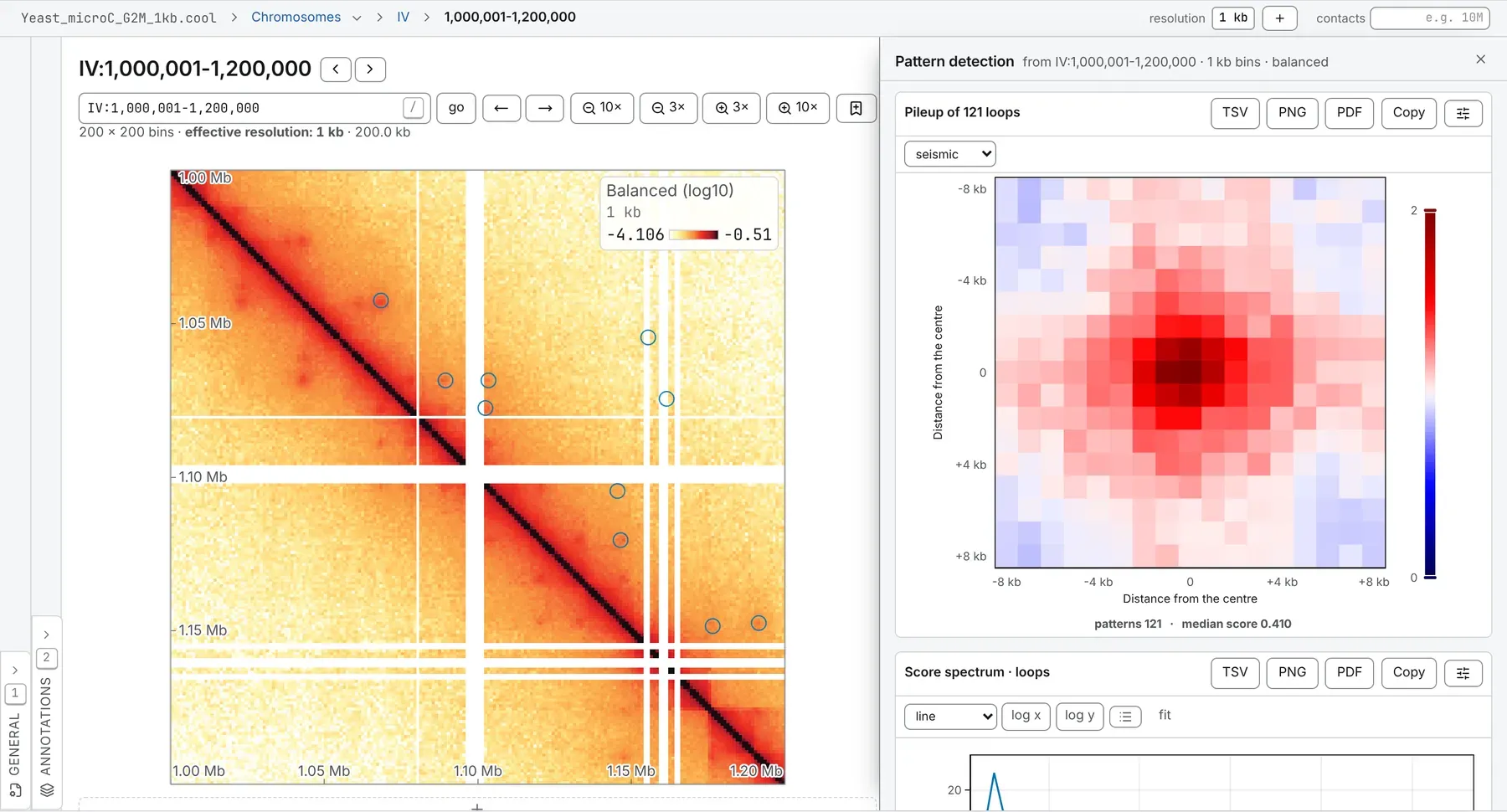
The calls land on the map as a set named for the pattern, such as Detected loops or Detected borders: a row of the Tracks card in the Annotations panel, marked *. Loops and stripes are pairs, drawn as rings and saved as BEDPE; borders, hairpins and centromeres are single bins, drawn as short diagonal markers and saved as BED. The drawer’s table lists the strongest 200 calls; the set holds every one.
The same run from a shell:
chromosomix chromosight <map> [--<parameter> <value> …] --out <dir>chromosomix chromosight sample.cool --pattern borders --out results/Parameters
Section titled “Parameters”Every threshold follows the pattern, tuned with its template. With thresholds at from the pattern, the default, the boxes stay hidden; Set them myself opens them at the loops preset, to check against your pattern; its distances are counts of bins. The presets, in base pairs, become bins of your file:
| Pattern | Template | Score threshold | Furthest from the diagonal | Nearest to the diagonal | Nearest two calls may be |
|---|---|---|---|---|---|
| loops | 17 × 17 | 0.3 | 2 Mb | 20 kb | 5 kb |
| loops small | 7 × 7 | 0.5 | 2 Mb | 20 kb | 5 kb |
| borders | 17 × 17, three | 0.15 | on the diagonal | — | 5 kb |
| hairpins | 15 × 15 | 0.1 | on the diagonal | — | 5 kb |
| centromeres | 81 × 81 | 0.5 | on the diagonal | — | 100 kb |
| stripes left, stripes right | 31 × 31 | 0.17 | 2 Mb | 60 kb | 40 kb |
| Parameter | Takes | Default | What it does |
|---|---|---|---|
| General | |||
pattern--pattern <value> | loops, loops_small, borders, hairpins, centromeres, stripes_left or stripes_right | loops | Every threshold below follows the template: they were tuned together. loops — focal contacts between two anchors — the classic dot off the diagonal; loops_small — the same, at a tighter 7×7 template, for short-range dots; borders — domain boundaries: the corner where one self-interacting block ends and the next begins; hairpins — the fold-back signal of a hairpin, on the diagonal; centromeres — the large-scale depletion around a centromere; stripes_left — an architectural stripe running left from an anchor; stripes_right — an architectural stripe running right from an anchor. |
sequences--sequences <name,…> | sequence names, comma-separated | Every sequence of the file when left out. | — |
use balancing weights--no-balance | a switch | On wherever the file carries balancing weights; --no-balance reads the raw counts. | — |
| Scan | |||
thresholds--thresholds <value> | preset or custom | preset | preset — the template’s own numbers, tuned for it and published with it; custom — the boxes start at the loops preset; check them against the pattern you picked. |
score threshold--pearson <n> | a number, 0 to 1 | 0.3 | The correlation a pixel must reach to be a candidate; lower finds more, and more of it is noise. Read only under other settings of this task. |
nearest to the diagonal--minDist <n> | a whole number, at least 0, in bins | 10 | Read only under other settings of this task. |
furthest from the diagonal--maxDist <n> | a whole number, at least 0, in bins | 1000 | The scan band: widening it costs time in proportion, and zero puts the pattern on the diagonal. Read only under other settings of this task. |
nearest two calls may be--minSeparation <n> | a whole number, at least 0, in bins | 3 | Closer than this on both axes and only the higher-scoring one is kept. Read only under other settings of this task. |
refinement passes--iterations <n> | a whole number, 1 to 5 | 1 | Each pass re-scans with the pileup of what the last one found as its template. |
| Quality | |||
most undetectable pixels a window may hold--maxPercUndetected <n> | a number, 0 to 100, in % | 50 | Read only under other settings of this task. |
most empty pixels a window may hold--maxPercZero <n> | a number, 0 to 100, in % | 10 | Read only under other settings of this task. |
detectability cut--nMads <n> | a number, 1 to 20 | 5 | Median absolute deviations below the median coverage, and only read where the file has no weights. |
report down to a q-value of--maxQvalue <n> | a number, 0 to 1 | 1 | Benjamini-Hochberg over every call; 1 keeps them all and still reports the number. |
What it writes
Section titled “What it writes”- intervals: a set of intervals: TSV, and BED (or BEDPE for pairs, or bed3d and PDB for a 3D model)
- matrix: a matrix, a pileup or a heatmap: TSV
- curve: a curve: TSV
- table: a table: TSV
On the command line every file goes into --out as <file stem>.chromosight.<output>.<ext>, and each TSV opens with # lines naming the build, the file and every parameter that produced it.
Reading the result
Section titled “Reading the result”Scores and q-values
Section titled “Scores and q-values”A call’s score is its window’s Pearson correlation with the template: the closer to 1, the more it looks like the pattern. Every call is at or above the score threshold. Its p-value comes from the correlation, and its q-value from Benjamini-Hochberg over every call of the run, so it depends on which sequences were ticked; report down to a q-value of at 1, the default, keeps every call.
The pileup
Section titled “The pileup”The pileup is the mean of every called window, on chromosight’s fixed scale: seismic from 0 to 2, with 1, the expected on the detrended map, in the middle. The scale does not move with the data, so a pileup can be set beside another run’s or a published chromosight figure. Under it are the number of patterns and their median score. A good set shows its pattern plainly in the middle, on a background near 1.
The score spectrum
Section titled “The score spectrum”The Score spectrum shows how the scores spread from the threshold up. A peak clear of the threshold says the calls are a population of their own; a shoulder running down to it says the calling stopped at the threshold, not where the pattern did.
The loop spectrum
Section titled “The loop spectrum”The Loop spectrum, off the diagonal only, sets each call’s score against its anchors’ separation, with the median in log-spaced bands. A set whose 30 kb calls are loops and whose 2 Mb calls are noise looks fine in a pileup or a histogram; here it does not. Scores that fall away with separation are distance decay the detrending missed; scores piled at the nearest distance are calls on the diagonal’s own shoulder.
What to watch for
Section titled “What to watch for”- Balancing. On a file without balancing weights, detectable bins are chosen by detectability cut on the raw coverage, and the drawer says the scores then match chromosight’s in kind, not to the digit.
- Missing data. A window with more than the pattern’s share of undetectable or empty pixels is not scored; the drawer says how many candidates that dropped.
- Band size. A sequence whose scan band would not fit is skipped and named: bring furthest from the diagonal down, or open a coarser resolution.
- Refinement. A pileup with gaps cannot be a template, so refinement passes stop there, and the drawer says on which sequence.
- Circular sequences. Near the junction of a sequence ticked circular, the expected is the far end of the distance law: a seam at the junction, not a wrong answer elsewhere.
To score a loop set you already have against a template, use the Chromosight normalisation of aggregate peak analysis.
Compared with chromosight
Section titled “Compared with chromosight”This is chromosight’s detection, rule for rule. In § 6 of the validation, on a yeast Micro-C map at 800 bp, it calls the same loops at the same bin pairs as chromosight detect 1.6.3, with the same scores, and p- and q-values that agree to the digits printed.
Documentation of chromosomix v0.20.0 · built from 40ec1ec · source