
Aggregate peak analysis
- In the app
- Analysis panel, under 2D tasks: Aggregate peak analysis
- Command
chromosomix apa- Reads
- A contact map
- Also known as
- APA, pileup, aggregate, loops, coolpup
Aggregate peak analysis averages the contact map over a set of places, so a pattern too faint to see at any one of them stands out in the mean. Over loops it shows whether they are there; over every pair of a peak set, whether those places touch more than places like them; over domains, whether contact stops at their edges.
Running it
Section titled “Running it”It needs a map and a set loaded on the Annotations panel: a loop set (BEDPE, interact or longrange; see Interactions) or a feature set (BED, narrowPeak, GTF and the rest; see Tracks and features). A set a task called works too, such as the loops of Loop calling or the domains of diamond insulation.
In the Analysis panel (4), choose Aggregate peak analysis, pick the anchors and the set, and press run:
- loop set: a window at each pair, leaving out loops nearer the diagonal than nearest loop.
- feature set: a window on the diagonal at each feature, about the point anchor on names; start and end follow the strand.
- every pair of a feature set: a window between every two features within the separation range. Past 200,000 pairs, a uniform sample is taken, the same each time.
- consecutive features: each feature with the next along its sequence.
The same run from a shell:
chromosomix apa <map> --pairs <pairs.bedpe> [--<parameter> <value> …] --out <dir># A loop set, over the expectedchromosomix apa sample.mcool::/resolutions/10000 --pairs loops.bedpe --out results/
# Each CTCF peak with the next along its chromosomechromosomix apa sample.mcool::/resolutions/10000 --anchors consecutive --features ctcf_peaks.bed --out results/
# A domain pileup: every domain stretched onto one grid, half its length either sidechromosomix apa sample.mcool::/resolutions/2000 --anchors features --features domains.bed --mode scaled --out results/Parameters
Section titled “Parameters”The anchors, the mode and the normalisation decide what the picture is of; the cards under them, Control, Separation, Ranking and Tracks, appear only when they apply. Start from the defaults, 21 bins either side over the expected, and change one setting at a time.
| Parameter | Takes | Default | What it does |
|---|---|---|---|
| General | |||
anchors--anchors <value> | pairs, features, allpairs or consecutive | pairs | pairs — off the diagonal, between two anchors; features — on the diagonal, at each feature; allpairs — off the diagonal, between every two features within a separation range — the test of whether a set of places contacts itself; consecutive — off the diagonal, between each feature and the next one along its sequence — the pairs of neighbouring sites, such as consecutive CTCF peaks. |
pairs--pairs <file> | a file: a set of pairs | — | — |
features--features <file> | a file: a feature set | — | Read only under other settings of this task. |
mode--mode <value> | fixed or scaled | fixed | fixed — centre plus or minus a number of bins; scaled — flank, the feature, flank — every window on one grid. Over a set of domains this is the domain pileup: the TAD in the middle and its two boundaries as the cross through it. |
anchor on--at <value> | centre, start or end | centre | centre — half way along the feature; start — its 5′ end — a TSS, on a gene model; end — its 3′ end. Read only under other settings of this task. |
half-width--window <n> | a whole number, 1 to 200, in bins | 21 | — |
grid--grid <n> | a whole number, 11 to 201 | 51 | Every window resampled to this many cells a side; a multiple of four puts the feature’s two ends on axis ticks. Read only under other settings of this task. |
flank--flankFraction <n> | a number, 0 to 2 | 0.5 | As a fraction of the feature’s own length each side: at 0.5 the feature is the middle half of the picture, at 1 the middle third. Read only under other settings of this task. |
diagonals left out--minDiag <n> | a whole number, 0 to 50 | 2 | The main diagonal and the ones beside it, left out of every window; 0 keeps every one. |
normalisation--norm <value> | matched, oe, none or chromosight | oe | matched — against shifted anchors at the same separations. Controls for local background too; oe — each window over its sequence’s own P(s). Controls for the distance decay only; none — the raw pileup; chromosight — the map detrended by its own distance law, then averaged — and every anchor scored against the template. |
template--csPattern <value> | loops, loops_small, borders, hairpins, centromeres, stripes_left or stripes_right | loops | What each window is scored against, and how wide it is. loops — focal contacts between two anchors — the classic dot off the diagonal; loops_small — the same, at a tighter 7×7 template, for short-range dots; borders — domain boundaries: the corner where one self-interacting block ends and the next begins; hairpins — the fold-back signal of a hairpin, on the diagonal; centromeres — the large-scale depletion around a centromere; stripes_left — an architectural stripe running left from an anchor; stripes_right — an architectural stripe running right from an anchor. Read only under other settings of this task. |
use balancing weights--no-balance | a switch | On wherever the file carries balancing weights; --no-balance reads the raw counts. | — |
| Control | |||
controls per pair--controls <n> | a whole number, 1 to 25 | 5 | Read only under other settings of this task. |
smallest shift--minShift <n> | a whole number, at least 0, in bins | 50 | A control nearer than the window’s own width overlaps the anchors it stands in for. Read only under other settings of this task. |
largest shift--maxShift <n> | a whole number, at least 1, in bins | 500 | Read only under other settings of this task. |
smallest shift--minShiftScale <n> | a number, 0 to 20 | 1 | As a multiple of the window’s own width; below 1 a control overlaps the feature. Read only under other settings of this task. |
largest shift--maxShiftScale <n> | a number, 0.5 to 50 | 3 | Read only under other settings of this task. |
seed--seed <n> | a seed, a whole number | 1 | The same seed gives the same control twice. Read only under other settings of this task. |
| Separation | |||
nearest loop--minDist <n> | a whole number, at least 0, in bins | 5 | Loops nearer the diagonal than this are left out, 0 keeping every one; from twice the half-width and two, no window reaches the first two diagonals. |
nearest two features may be--minSep <n> | a whole number, at least 0, in bins | 2 | Below this a pair is mostly the diagonal it sits on rather than a contact between two places. Read only under other settings of this task. |
furthest two features may be--maxSep <n> | a whole number, at least 1, in bins | 200 | Read only under other settings of this task. |
split by separation into--byDistance <n> | a whole number, 0 to 6 | 0 | Log-spaced bands, each piled up on its own with its own control; one band averages a 30 kb contact and a 2 Mb one into a picture of neither. |
| Ranking | |||
rank by--rankBy <column> | a numeric column of the set --features names; optional | not used | Read only under other settings of this task. |
then--subset <value> | all, top or groups | all | all — one pileup; top — top N; groups — k groups. Read only under other settings of this task. |
N--count <n> | a whole number, at least 1 | 500 | Read only under other settings of this task. |
groups--groups <n> | a whole number, 2 to 6 | 4 | Read only under other settings of this task. |
| Tracks | |||
track aggregates--tracks <file,…> | files: a signal track; optional | not used | Each is averaged over the same windows the pileup is taken from and drawn along its two edges — the aggregate signal above and beside the aggregate map. |
same profile both sides--symmetric / --no-symmetric | on or off | on | One aggregate over every anchor, drawn identically above and beside. Untick to keep each pair’s two anchors apart — the second along the top, the first down the right. Read only under other settings of this task. |
What it writes
Section titled “What it writes”- matrix: a matrix, a pileup or a heatmap: TSV
- table: a table: TSV
- curve: a curve: TSV
On the command line every file goes into --out as <file stem>.apa.<output>.<ext>, and each TSV opens with # lines naming the build, the file and every parameter that produced it.
Reading the result
Section titled “Reading the result”The picture
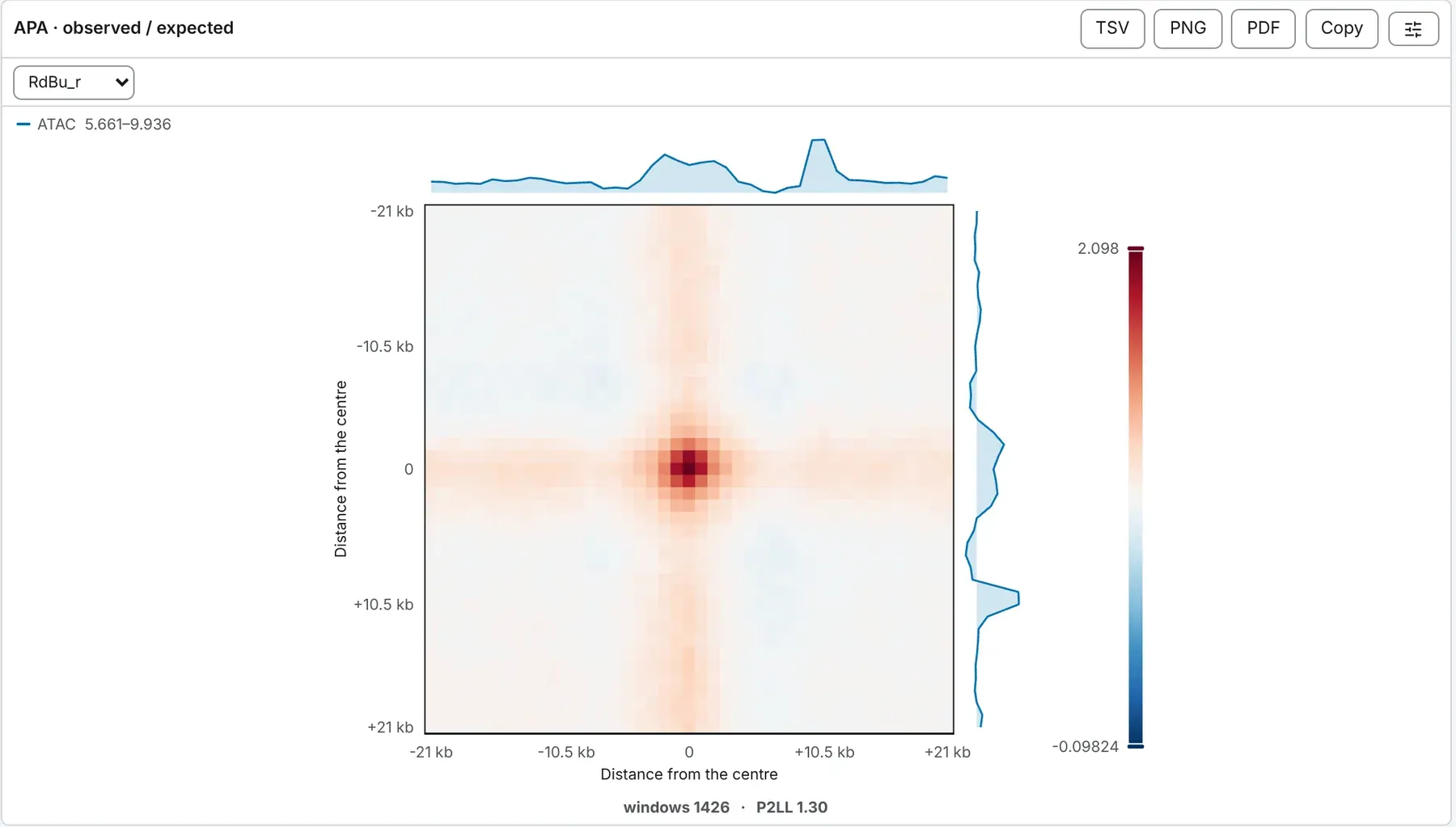
Section titled “The picture”Under observed / expected, the default, the pileup is APA · observed / expected: each window is divided, cell by cell, by its sequence’s expected contact at that separation, then averaged. Under distance-matched the pileup is divided by its shifted controls’ pileup. Either way 1 is the middle of a diverging scale and above it is more contact than expected: real loops give a dot at the centre. Under none the pileup is the raw mean, on the map’s own scale.
A fixed window’s axes are distances from the anchor, -21 kb to +21 kb at the default half-width on a 1 kb map; a domain pileup’s run from 0 to 1 along the feature, flanks either side.
P2LL, and the per-anchor table
Section titled “P2LL, and the per-anchor table”windows counts the anchors that contributed. P2LL is the mean of the centre, a fifth of the window across, over the mean of the lower-left corner of the same size, a background at a comparable separation. Above 1 is enrichment. The Per anchor table gives each window’s P2LL and separation, strongest first.
The loop spectrum
Section titled “The loop spectrum”The Loop spectrum, for anchors off the diagonal, sets each window’s P2LL against its separation, with the median in log-spaced bands. Loops at short range and noise at long range average into one plausible dot in the pileup; here they come apart.
Domain pileups
Section titled “Domain pileups”Scaled, over a feature set on the diagonal, the pileup is a domain pileup: each domain the square in the middle, its boundaries the cross through it. P2LL is the wrong number here, reading well above 1 even for a set with no boundaries, so a domain pileup reports in / out: the block just inside the domain at its widest separation, over the same block across each boundary. Above 1, contact stops at the edge; 1 means no boundary. Per anchor lists each domain’s in / out.
Over the expected, windows are stretched evenly onto the grid, as coolpuppy rescales them, with gaps where values are missing. Under the distance-matched control or none, each domain’s two ends are pinned to the same grid lines, the better picture of a set of boundaries. Scaled windows over pairs run only under those two.
Under the Chromosight normalisation
Section titled “Under the Chromosight normalisation”The map is detrended by its own distance law, every window is the size of the template, and each anchor is scored as chromosight scores it. The pileup is drawn on chromosight’s fixed scale, seismic from 0 to 2 with 1 in the middle. A score spectrum shows every anchor’s correlation with the template, its title counting those that reach the template’s calling threshold; off the diagonal, the loop spectrum sets those scores against separation; Per anchor gives each score, p-value and q-value. An anchor whose window holds too many undetectable or empty pixels is listed with no score and adds nothing to the pileup. Track aggregates are not drawn.
Track aggregates
Section titled “Track aggregates”Each track ticked under track aggregates, a bigWig or a computed track, is averaged over the pileup’s windows (never the controls) and drawn along the top and right edges, on its own range, printed in the key. Off the diagonal, same profile both sides pools each pair’s two anchors; untick it where the order of a BEDPE’s anchors means something, such as a promoter always first. A track that could not be read is left out, and the drawer says so.
Splitting and ranking
Section titled “Splitting and ranking”- Split by separation into cuts a set off the diagonal into up to six log-spaced bands, each with its own control. One pileup from 30 kb to 2 Mb averages a strong short-range contact and a weak long-range one into a picture of neither.
- Rank by, over a feature set on the diagonal, sorts it by a numeric column; then takes the top N, or cuts it into K groups piled up on their own. The strongest group beside the weakest is what tests a set of calls.
What to watch for
Section titled “What to watch for”- Loops near the diagonal. Nothing below the diagonal is used, and diagonals left out removes the main diagonal and the one beside it: a window that reaches the diagonal has gaps there, and its cells near it, P2LL’s lower-left corner among them, average fewer loops. From twice the half-width plus two bins, coolpuppy’s default floor, no window reaches the first two diagonals; this task’s nearest loop is 5 bins unless you set it.
- Missing windows. A window that runs off its sequence is not piled up; a half-empty one adds what it has.
- Random controls. The same seed gives the same distance-matched controls; the spread between two seeds’ pileups is the scale to read a difference on.
Compared with coolpuppy
Section titled “Compared with coolpuppy”Windows are cut as coolpuppy cuts them, from the upper triangle with min_diag diagonals left out, and observed / expected divides each window by cooltools’ balanced.avg before the mean. In § 11 of the validation, on a mouse Hi-C map at 10 kb, the raw and observed / expected pileups have the same gaps as coolpuppy’s and agree in every other cell within float32 rounding; over shifted controls the two differ as two coolpuppy runs do. § 12 holds the Chromosight normalisation to chromosight quantify, and § 24 holds pileups of consecutive CTCF peaks and of domains to coolpuppy.
To set a coolpuppy run beside one of these, give both the same settings; the default nearest loop differs:
| chromosomix | coolpuppy |
|---|---|
--window 5 (bins either side) |
flank=50_000 at 10 kb: the half-width times the bin size |
--minDiag 2 |
min_diag=2 |
--minDist 12: twice the half-width and two |
mindist='auto', its default |
--minDist 0 |
mindist=0 |
--norm none |
ooe=False |
--norm oe |
ooe=True, with an expected |
--anchors features |
local=True |
--norm matched --controls 5 --minShift 50 --maxShift 500 |
nshifts=5, with minshift and maxshift in base pairs |
--anchors features --mode scaled --grid 51 --flankFraction 0.5 --norm oe |
local=True, rescale=True, rescale_size=51, rescale_flank=0.5, with an expected |
Documentation of chromosomix v0.20.0 · built from 40ec1ec · source