
Jupyter notebooks
The chromosomix Python package puts the app in a notebook cell, moved from Python. It works wherever anywidget does: JupyterLab, Jupyter Notebook 7, VS Code, Google Colab and marimo.
Install
Section titled “Install”pip install chromosomixFrom a clone, pip install -e widgets/python. It needs Python 3.10 or later. Behind JupyterHub, see below.
A map and its tracks
Section titled “A map and its tracks”from chromosomix import Chromosomix
yeast = 'https://rsglab-data.s3.eu-west-3.amazonaws.com/demo/yeast/'view = Chromosomix( yeast + 'Yeast_microC_G2M_1kb.cool', region='IV:1000000-1400000', tracks=[yeast + 'Yeast_ATAC.bw', yeast + 'Yeast_annotations.gtf'], transform='log10',)view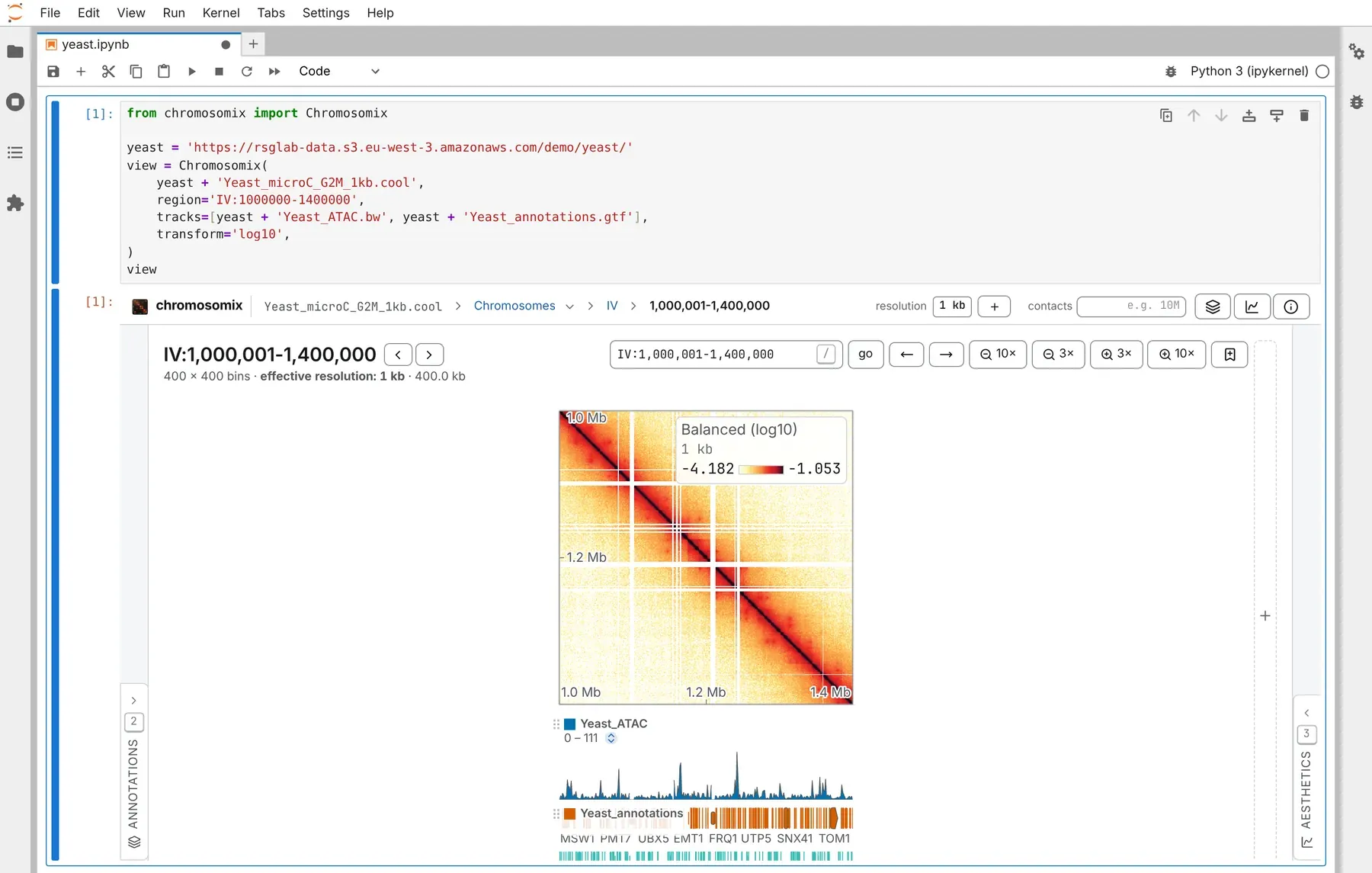
| Argument | What it is |
|---|---|
map |
the contact map, a path or an address. :: names a group inside it: 'sample.mcool::/resolutions/5000'. Leave it out for a 1D browser of the tracks |
tracks |
files added once the view is drawn, in order, as the header’s + adds them: tracks, maps, 3D models, workspaces |
region |
where the map is framed: 'IV:1000000-1400000', counted from 0 as cooler counts, or ('IV', 1_000_000, 1_400_000) |
locus |
where a 1D browser is placed: 'IV:400,001-460,000', 1-based |
height |
the frame’s height in pixels; 600 by default |
viewer |
the build of the viewer in the frame (below) |
| any other keyword | a key of the view from Link keys: transform, colormap, balance, vmin, vmax, oe, smooth, view… |
A key takes one value, as a link writes it: maps='a.cool|b.cool', not a list. A path under uri, uri2 or maps is served from the kernel like the map.
To make the frame taller or shorter, drag the grip under its corner, or focus it and use the arrow keys; a double click puts back the height you gave. The height you leave it at is the widget’s height, so view.height reads what is on screen.
Moving it from Python
Section titled “Moving it from Python”view.goto('IV:1150000-1300000') # a region of the map, or a locus in the 1D browserview.navigate(transform='log2', oe=True) # any key a link carries; None removes oneview.add(yeast + 'Yeast_structure.g3d.gz') # the header's +: a track, a map, a 3D modelgotoframes a square on the diagonal, dropping any off-diagonal block or zoom, or moves the 1D browser’s locus. It takes a string or a(sequence, start, end)tuple.navigatechanges only the keys you give.addputs more files in the cell; a 3D model opens in a cell of its own beside the map.load(map, tracks=…, region=…)opens another map in a new frame, after checking every file: a missing one raises and leaves the cell as it was.
Requests are kept, so a notebook run before its frame is drawn, or opened again, ends where Python last put the view.
Where the reader is
Section titled “Where the reader is”view.state |
where the view is now: a dict of the keys a link carries (uri, view, region, locus…), or None on the landing page. It follows the reader’s pans and zooms |
view.rendered |
the report of the last finished picture: what is drawn, at which resolution |
view.version |
the viewer’s version, once its frame is up |
view.notice |
what the frame could not do — a viewer too old to take files — or '' |
view.viewer |
the address of the build in the frame |
state is a traitlet, so a cell can watch it:
view.observe(lambda change: print((change['new'] or {}).get('region')), names='state')A 1D browser
Section titled “A 1D browser”With no map, the first file becomes the cell’s: a bigWig opens a genome browser over its assembly, with the rest as its tracks. locus= then places the browser, and region= frames a map the first file opens.
browser = Chromosomix( tracks=[yeast + 'Yeast_ATAC.bw', yeast + 'Yeast_ChIP_Pol2-vs-input.bw', yeast + 'Yeast_annotations.gtf'], height=540,)browserbrowser.goto('IV:400,001-460,000')Files on the kernel’s disk
Section titled “Files on the kernel’s disk”The kernel serves a path to the viewer by byte range, from 127.0.0.1. Nothing leaves its machine.
from pathlib import Path
data = Path('~/data/yeast').expanduser()Chromosomix(data / 'Yeast_microC_G2M_1kb.cool', region='IV:1000000-1400000', tracks=[data / 'Yeast_ATAC.bw'])- The file’s folder is served, so sidecars beside it (
.bai,.fai,.tbi,.px2) are found. Nothing outside it is served, nor any name starting with a dot: naming one raises. - A link is followed, with its sidecars looked for beside the link, as DataLad and git-annex files need.
chromosomix.serve(path)returns the address the viewer reads a local file at;chromosomix.address(file)keeps an address and serves a path.
Which viewer
Section titled “Which viewer”viewer= |
The build |
|---|---|
| nothing | CHROMOSOMIX_VIEWER if it is set, else a build fetched by install_viewer(), else https://chromosomix.app/ |
a version, '0.17.0' |
that release, kept for good at https://chromosomix.app/v/v0.17.0/: what a notebook that must draw the same picture next year names |
| an address | any build, a lab’s own copy of the viewer among them |
| a folder | a built dist/ on this machine, served beside the data |
Tracks need a viewer from 0.17.0 on. An older build draws the map but nothing the widget adds, and says so above the frame and in view.notice; naming an older release warns at once.
With files on the kernel’s disk, prefer a build served beside them. chromosomix.install_viewer() fetches the viewer from npm once, checks npm’s integrity hash, and caches it in ~/.cache/chromosomix/ (or CHROMOSOMIX_CACHE), so the notebook works offline; install_viewer('0.19.0') fetches a given release. Otherwise Chrome asks the reader once to let the site reach this machine.
JupyterHub, Colab and other proxies
Section titled “JupyterHub, Colab and other proxies”- Behind JupyterHub, install jupyter-server-proxy in the environment
jupyter labruns from, not only the kernel’s. There, local files are read only by a viewer the kernel serves: runchromosomix.install_viewer()once, or setCHROMOSOMIX_VIEWERorviewer=to a builtdist/. The proxy refuses answers over 100 MB, which matters only for a file read whole, such as an annotation file with no tabix index: bgzip and index it. - In Colab, there is nothing to set.
- Any other way in: set
CHROMOSOMIX_PUBLIC_URLto the address the browser reaches the server at, with{port}where the port goes.
In marimo
Section titled “In marimo”marimo reruns every cell that names a mo.ui.anywidget wrapper on every move, so name the wrapper only where you read where the reader is, and drive the widget itself:
import marimo as mofrom chromosomix import Chromosomix
view = Chromosomix(MAP, region='IV:1000000-1400000', tracks=[ATAC]) # MAP and ATAC: a map and a tracklive = mo.ui.anywidget(view)liveview.goto('IV:1150000-1300000') # names `view`: runs once(live.state or {}).get('region') # names `live`: runs again wherever the reader goeslive.goto(…) would pull the view back on every move, and live.add(…) add the file again on every report. marimo edit cuts a cell’s output at 610 px; marimo run shows the whole height.
The demo notebooks
Section titled “The demo notebooks”demo.ipynb and demo_marimo.py walk through all of this on the yeast demo. The widget is an embed, which keeps and drops what an embedded view does; the package’s notes are in its README.
Documentation of chromosomix v0.20.0 · built from 40ec1ec · source