
Data stores
A data store is a catalogue of somebody’s files, with enough about each — cell line, assay, assembly, size — to choose it without opening it. Its files are read by range from where they are published, and nothing is fetched until you open a store.
The built-in stores
Section titled “The built-in stores”The landing page’s Connect to a data store has a tile per store.
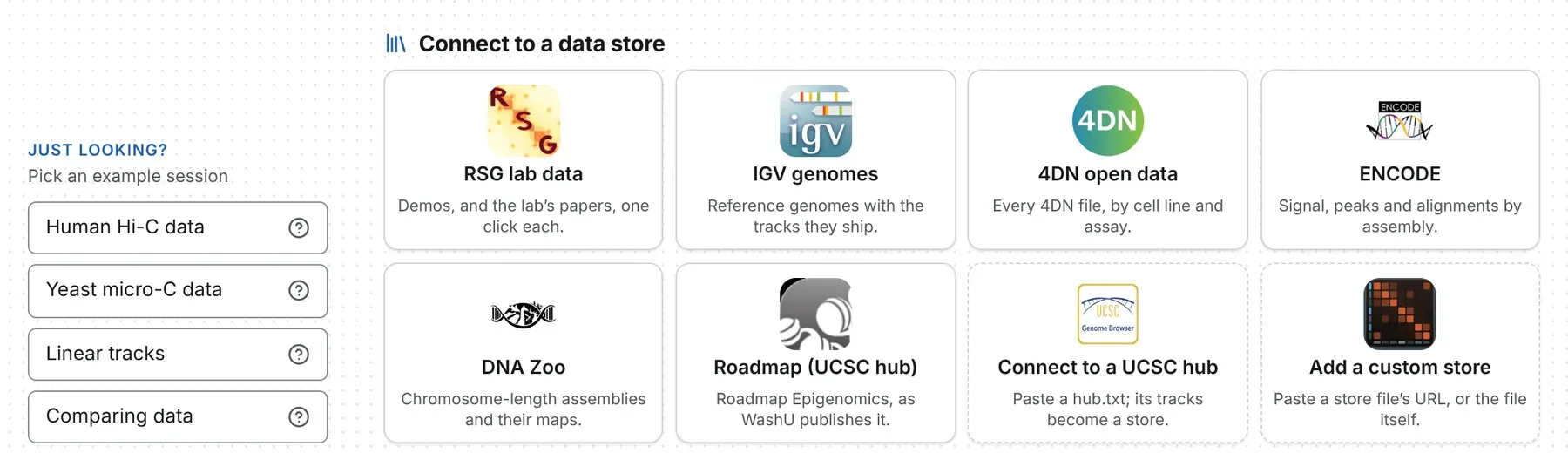
| Store | What it holds | Drawn as |
|---|---|---|
| RSG lab data | the lab’s demos of the viewer and the figures of its papers | a card per figure, under Demo and Papers |
| IGV genomes | IGV’s reference genomes and the tracks it ships for each | a card per genome, opening it with its tracks in the 1D browser |
| 4DN open data | every file on the 4DN open-data bucket | a faceted list, grouped by experiment set |
| ENCODE | ENCODE’s released signal, peaks and alignments, by assembly | a faceted list, grouped by experiment |
| DNA Zoo | chromosome-length assemblies and the Hi-C maps behind them | a faceted list, grouped by species |
| Roadmap (UCSC hub) | the Roadmap Epigenomics integrative tracks, as WashU publishes them | a hub, grouped by assembly |
ENCODE’s Genome and Files tick boxes, at the top of its facets, choose which assemblies and
kinds of file are read. 4DN and ENCODE leave out Hi-C alignment files, which are in read-pair order
and cannot be drawn as reads; the same experiments’ .pairs files and contact maps are there.
Beside the tiles, Just looking? offers four example sessions — Human Hi-C data, Yeast micro-C
data, Linear tracks and Comparing data — and the ? on each says what it holds.
The store drawer
Section titled “The store drawer”A store opens in a drawer down the left of the window, one per window. Its head has the store’s name, every tile (to switch stores), a link button, an arrow to the store’s website — for a hub, UCSC’s list of public hubs — and a download of the catalogue as narrowed.
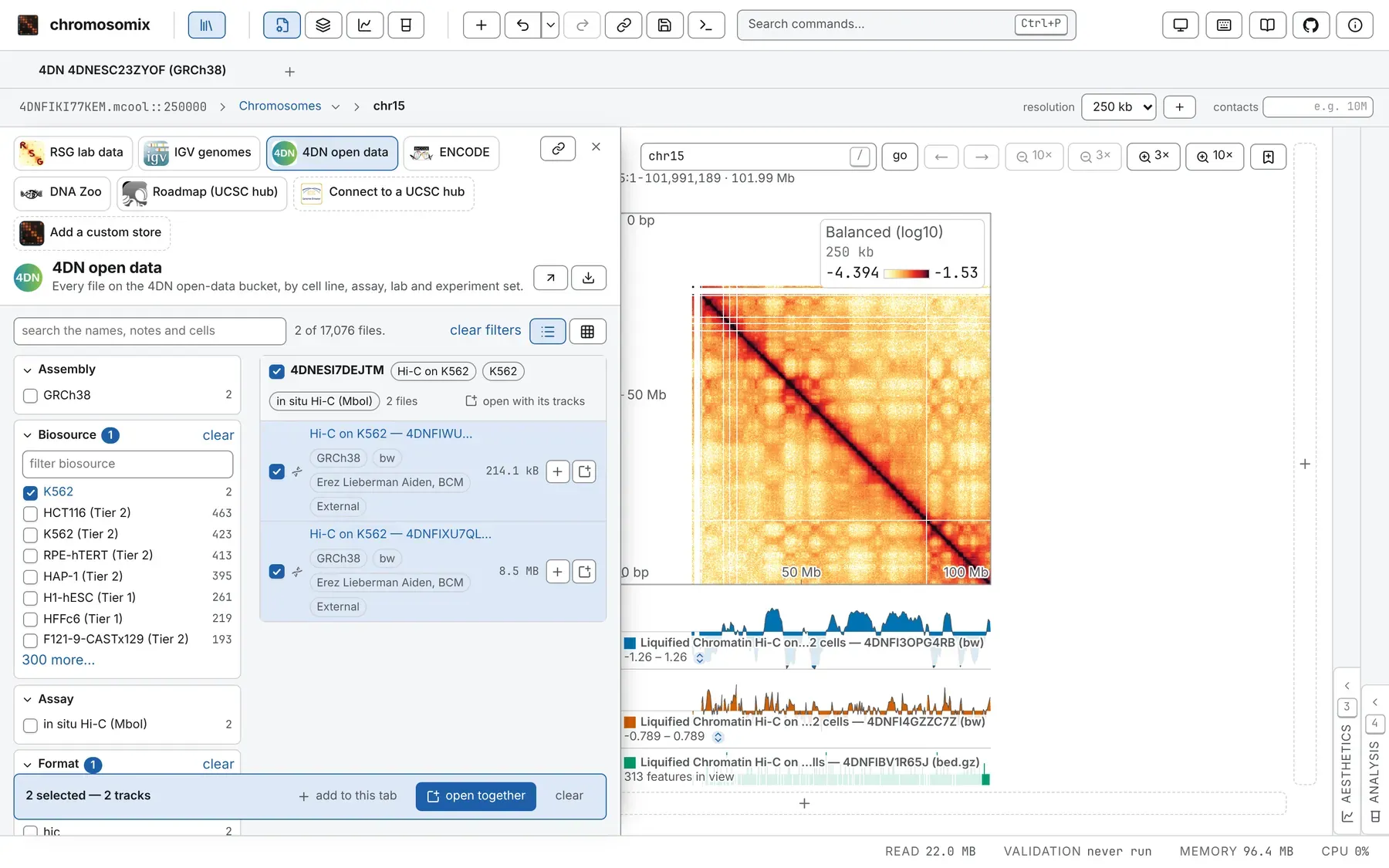
The stores button in the header, the \ key and Stores in the command palette open and close it, on the store you were last on; Esc puts it away. A faceted store has:
- facets, one per column, each value counted by what ticking it would add: ticks in one facet are either-or, ticks in different facets must all hold;
- a search box, search the names, notes and cells, matching every word in any order;
- a list, or a matrix of two facets (down and across), each cell a count that ticks both its values when pressed;
- clear filters.
The list draws the first 1,000 rows: narrow it to see the rest. Rows are grouped by experiment, set
or species, and a group’s open with its tracks opens its session. A row names the file as the
store does — Hi-C on HFF cells, protocol variations, not 4DNFI24F7GRY.mcool — and the name stays
with it once open.
Opening what you find
Section titled “Opening what you find”Each file’s row has two marks: + adds it to the tab in front (a map beside the map there, anything else as a track), and the window mark opens it in a tab of its own. A session’s row opens as tabs. Rows can also be dragged wherever a file can be dropped (Opening files).
Tick several rows for a tray: open together opens the first map ticked and adds the rest, in ticking order; add to this tab adds each to the tab in front; clear unticks them. Opening folds the drawer away; adding keeps it up. A row never replaces what a tab holds. A map with tracks published beside it offers load the N tracks published with this map on the Tracks card.
Connecting a UCSC hub
Section titled “Connecting a UCSC hub”Paste the address of a hub’s hub.txt into the Connect to a UCSC hub tile and press open:
its genomes and the tracks chromosomix can draw become rows, grouped by assembly, its composite
tracks a facet.
- The genome row is an assembly hub’s
.2bit. A hub over an assembly UCSC hosts (genome hg38) takes it from thechromSizesit names, or its first bigWig or bigBed; a hub of nothing but BAMs has none. - open with its tracks, on an assembly’s heading, opens the genome with the tracks the hub turns on by default. The rest keep rows of their own, and the store’s description says how many are on: 440 tracks, 20 on by default.
- What is read:
bigWig,bigBed,bigNarrowPeak,bigGenePred,bigPsl,bigChain,bigMaf,bigLolly,bigDbSnp,bigRmsk,bigBarChart,barChart,bigInteract,interact,bigMethyl,bedMethyl,longTabix,vcfTabixandbamas tracks, andhicas a contact map. Anything else, such ascram, gets no row, and the store’s description counts it.
If the hub’s host allows no cross-origin read, paste its text under or paste the hub — one file,
or hub.txt, genomes.txt and trackDb.txt in turn — with the address its relative names hang
off, and press open what is pasted; fill in an example gives a working hub to start from.
Tracks on UCSC’s own servers, genome.ucsc.edu and hgdownload.soe.ucsc.edu, will not open either
way: those servers allow no cross-origin reads.
What a hub needs to be readable is on UCSC track hubs.
Adding a custom store
Section titled “Adding a custom store”A lab publishes a store as one JSON file beside its data (Your own data store). In the Add a custom store tile, paste its address and press open, or paste the file under or paste the store. remember this store keeps it as a tile in this browser; forget this store, on its page, takes it away. What this browser is remembering, in the command palette, lists remembered stores and can forget them.
Links to a store
Section titled “Links to a store”The address bar holds the store as you have narrowed it, and the drawer’s link button copies it.
https://chromosomix.app/?store=4dn&q=HFF opens 4DN searched for HFF: ?store= takes a built-in
store’s id (rsg, igv, 4dn, encode, dnazoo, roadmap) or the address of a store file or a
hub.txt, q= the search, and <column>=<value> ticks a facet.
Private files
Section titled “Private files”A store’s rows are read as the files they name would be: with a connected bucket’s key, a Google or
Dropbox sign-in, or a presigned link that works until it expires (Opening files).
A Google sign-in lasts about an hour; then the refusal offers sign in again. No server stands
between you and the data, so a host that will not answer a browser cannot be read: the Aiden Lab
bucket hicfiles.s3.amazonaws.com, for one, answers only IGV’s own programs.
When a store will not load
Section titled “When a store will not load”- Nothing has been published for … yet — a built-in store whose catalogue is not on this copy of the site; the sentence says what publishes it.
- … could not be read — the host does not allow a cross-origin read; paste the file’s text instead.
- … answered with a page, not a store file — the address leads to a web page, often a sign-in page.
- … is not there: the host answered 404 — check the address.
Other refusals are on When a file will not open.
Documentation of chromosomix v0.20.0 · built from 40ec1ec · source